

Three years ago, I was doing exactly what most people who want to become an AI Automation Engineer are doing today. The moment a new AI tool came out, I jumped in and learned it. I learned ChatGPT, then Midjourney, then went through an AutoGPT phase, then n8n, then Make, then spent an entire month just reading LangChain docs. My list of tools kept growing, and so did my confidence. I assumed that if my tool knowledge was solid enough, work would simply show up.

That assumption fell apart in my very first discovery call. The client didn’t care what tools I knew. He asked one simple question:
“How do I get my customer support response time down from 6 hours to 1 hour?”
I had walked in with a list of tools. He had walked in with a problem. The call ended in 20 minutes. That’s when it hit me: I had spent the last eight months learning the wrong thing.
In 2026, and likely beyond, an AI Automation Engineer is one of the most promising AI careers for exactly this reason. The role exists to solve business problems, not showcase tool knowledge. And this is exactly where most beginners go wrong: they learn AI, not the business problem. This article exists to help you avoid that mistake.
The core idea is simple, though hard to actually follow: the goal isn’t to learn AI. The goal is to use AI to automate work that creates measurable business value. If you understand that idea first, every skill, project, and career decision in the rest of this roadmap will make much more sense.
AI Automation Engineer vs AI Engineer vs ML Engineer vs AI Agent Developer
Let’s clear up a common confusion first, since this is the question people ask most: what’s the difference between an AI Engineer, ML Engineer, AI Automation Engineer, and AI Agent Developer? Job postings use these terms loosely, too, so the confusion is real, not just yours.
An ML Engineer trains models: data pipelines, model architecture, accuracy metrics, and retraining. This role is heavy on math and statistics. If a question like “why is the model stuck at 87% accuracy” sounds interesting to you, this is your role.
An AI Engineer is more application-focused. They take existing models (GPT, Claude, Gemini) and integrate them into products. They don’t train models, they use them. People coming from a software engineering background tend to fit well here.
An AI Automation Engineer (that’s us) connects business workflows to AI and automation tools. We don’t build models, and we don’t do heavy coding either. We wire existing AI services, like the OpenAI API or the Claude API, into business systems such as CRMs, spreadsheets, and WhatsApp, so one specific outcome happens: saving time, cutting errors, or speeding up responses.
AI Agent Developer is the newest and fuzziest term right now. Honestly, the industry itself is still figuring this one out. Generally, it means building systems that can make multi-step decisions on their own and pick their own tools (using frameworks like LangChain or CrewAI), without a human approving every step. There’s a lot of overlap with AI Automation Engineering. The difference is that an automation engineer’s workflow tends to be predictable and linear, while an agent developer’s system makes more decisions on its own.
In practical terms, if you’re starting now, an AI Automation Engineer is the most accessible entry point. It needs less math, existing tools get you most of the way, and right now the demand is coming mostly from small and mid-sized businesses, not research labs.
1. What an AI Automation Engineer Actually Does
The real job sounds pretty boring the first time you hear it, because it isn’t “AI building.” It’s process mapping. You go inside a business, look at where time is being wasted, and fill that gap with a system that uses AI and APIs.
A typical day looks like this: understanding a client’s existing tools (Gmail, Google Sheets, WhatsApp, a CRM), pulling out one repetitive task, designing a workflow for it, building it, and then, the part people forget, maintaining it whenever an API changes versions or the client’s process shifts slightly.
Companies hire for this because their internal teams usually don’t have the time or the skill to build these small, messy automations themselves. Here’s a common example: a D2C skincare brand had a completely manual return and refund process. The team tracked requests in Excel, and customers waited two days for a reply. In cases like this, a simple automation that matches Shopify order data to the refund request form and flags it for auto-approval can cut response time from two days to four hours. This isn’t really AI work. It’s automation, with a touch of AI text classification.
Building the Workflow Is Only Part of It. The Real Job Is the Full Lifecycle
Beginners think building an automation means opening n8n and connecting a few nodes. That’s just one stage. The real job runs through seven stages, and the stages people skip are exactly where the 2 AM panic message from a client comes from.
Discovery → Workflow Design → Build → Testing → Deployment → Monitoring → Improvement.
In Discovery, you talk to the client and understand the actual process, which is often different from what they think the process is. In Workflow Design, you sketch the flow on paper or in a diagram tool before building anything. Build is the actual implementation. Testing is the stage that gets skipped the most, because the excitement is in building, not testing, but this is the stage that catches edge cases. Deployment means going live, with a rollback plan ready. Monitoring means you find out when something fails before your client does (more on this in Section 13). And Improvement: an automation is never really “done.” The business changes, and the automation has to change with it.
This kind of failure is common in production automation. A workflow can run fine for nine or ten days straight, then quietly break because of one edge case, and nobody notices until the client complains, sometimes days later.
AI Knowledge vs Business Outcomes
Here’s something most courses won’t tell you clearly: most businesses that hire AI Automation Engineers aren’t paying for tool knowledge alone. They’re paying for a measurable outcome. (Research labs and AI-first companies are a bit different. There, deep AI knowledge has its own value, but this article isn’t about those roles.) Whether you have a GPT-5 prompt engineering certificate or not usually doesn’t matter to the client. What matters is whether they’re saving 10 hours a week.
In practice, this means your pitch should always start with the outcome, not the tool. Saying “I’m an n8n expert” tells a client nothing. Saying “I’ll bring your lead response time down from 2 hours to 5 minutes” tells them everything.
2. Why Most AI Career Roadmaps Fail
The Tool-Chasing Trap
A new tool trends every week. CrewAI was the thing yesterday, something else is the thing today, and a third thing will be the thing next month. People who start with an “I need to learn AI” mindset get caught in this trap. They’re always one tool behind, and they never feel confident, because the goalpost keeps moving on its own.
A lot of beginners fall into exactly this: eight months, a dozen different tools, and not a single completed project. Confusion keeps growing, confidence keeps shrinking.
Role Clarity Before Skill Clarity
First, understand what problem the AI Automation Engineer role actually solves: repetitive, valuable business problems. Then figure out the three or four skills you need to solve that problem. Tools change all the time, but the skill of spotting a problem and turning it into a system doesn’t.
Common Mistakes Beginners Make
Signing up for random courses without thinking about what comes next. Collecting certificates as if they’re proof of anything, when no recruiter or client ever asks how many certificates you have. And tool-hopping, probably the most expensive mistake of all, because it burns time without producing a single deliverable.
A quick filter: before you enroll in your next course, pause for a minute and ask yourself, “What specific problem will this course teach me to solve?” If the answer isn’t clear, skip it.
3. Start With Problems, Not Tools
Skills don’t create income on their own. Solutions do. That line sounds a little cliché, but in practice, it means your value to a business comes from their specific pain point, not from how long your list of skills is.
Here are the five problems that show up most often in real-world automation projects, each with its own constraint, trade-off, and failure point.
Lead generation and routing. The constraint is time. A lead that goes uncontacted for five minutes starts going cold; this is the most common complaint in real estate and coaching businesses. The trade-off: an instant WhatsApp or SMS auto-reply (through Twilio or the WhatsApp Business API) solves this, but you pay per message, and that cost grows with scale. The failure point: an API key expires at 2 AM, and nobody notices until the client complains.
A typical flow looks like this: Lead Form → Webhook → n8n → OpenAI → Google Sheets → Slack Notification → Customer Reply. It looks small in a diagram, but almost any arrow can fail: a webhook timeout, an OpenAI rate limit, a Sheets API quota. The longer the chain, the more places it can break.
Customer support. The constraint is effort; a team keeps answering the same 20 questions over and over. The trade-off: an AI chatbot cuts that volume down, but it can also give a wrong or outdated answer that damages brand trust. The failure point: a business updates a policy (say, the return window goes from 7 to 15 days), nobody updates the bot, and a customer gets the wrong information.
Here, the flow usually looks like this: Customer Email → AI Classification → Priority Check → CRM Update → Human Approval → Reply Sent. Notice the “Human Approval” step. The people who remove it in the name of full autonomy are the same people whose bot quietly approves a wrong refund one day.
Reporting. The constraint is time; an agency’s team spends four or five hours every Monday morning just pulling data from Google Ads, Meta Ads, and GA4. The trade-off: an automated dashboard (using the Sheets API and Looker Studio) saves those hours, but ad platforms change their APIs without warning. The failure point, and the most dangerous one: the report looks fine, but the data is stale, and no alert goes off. The client ends up deciding on the wrong numbers.
Content publishing workflows. The constraint is effort; posting manually across multiple platforms. The trade-off: automating this with the WordPress REST API and a scheduler saves time, but it can strip away the personal touch. The failure point: low-quality, AI-generated content getting auto-published, which hurts both the brand and SEO.
Data entry. The constraint is money; mistakes in manual entry (invoices, GST numbers, amounts) get expensive fast. The trade-off: OCR combined with GPT extraction is fast, but not 100% accurate. The failure point: skipping the human review step, which lets a wrong amount slip into the system.
This is what outcome thinking really means. Instead of telling yourself, “I should learn Zapier,” think, “I’m going to build a system that saves this client 10 hours a week.” The first statement is about a tool. The second is about an outcome, and that’s the only one a client actually wants to hear.
4. Learn Automation Before AI
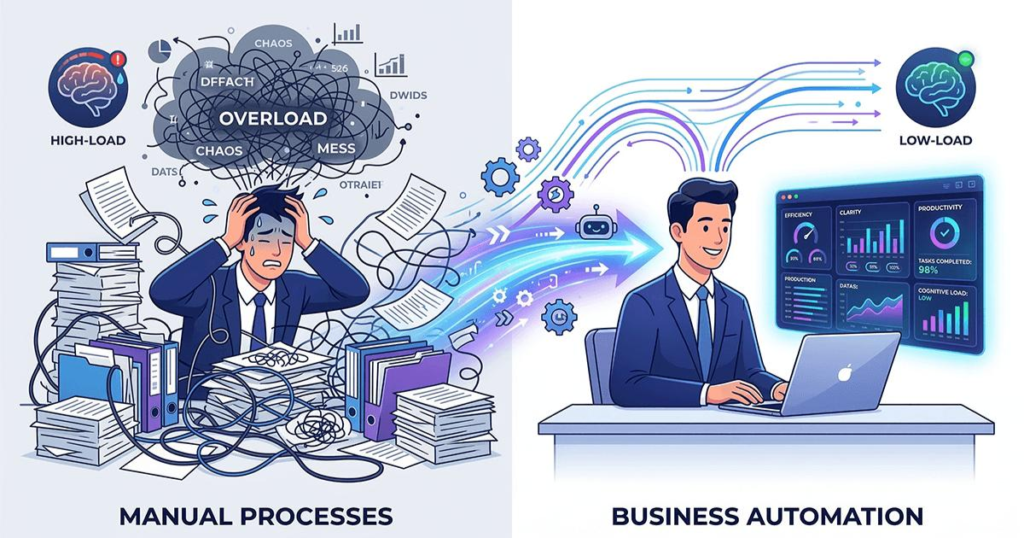
This order matters. Automation is the foundation: turning a repetitive task into a reliable, predictable system. AI sits on top of it like a multiplier, adding the judgment, language, or classification work that plain automation can’t do on its own.
People who jump straight into AI tend to build weak systems that break easily, because the underlying automation logic was never solid to begin with. Email automation, lead routing, content publishing, and client reporting: all of these are plain automation at their core. AI is just one smart step inside these workflows, not the whole system.
Building an automation mindset means spotting repetitive work (anything done more than three times manually is a candidate) and turning it into a system that runs without you having to step in every time.
5. APIs: The Glue Behind Modern Automation
There’s no need to go too deep into this, since it’s a well-covered topic already. The simple version: an API is a way for two apps to talk to each other without anyone manually copying and pasting data between them.
This matters because the core job of any automation is exactly that: connecting apps and moving data between them. Some beginner-friendly APIs you’ll use often: Gmail, Google Sheets, Slack, WordPress, and OpenAI. Build one small project with any of these, like sending data from a spreadsheet to Gmail, and the concept of an API stops feeling abstract.
6. The Skills That Actually Matter
The core skill stack is a mix of four things: automation thinking, understanding APIs, using AI tools effectively, and problem-solving. Of these, “AI tools” matter the least, but get the most attention.
Python (Keep This Section Short)
What you need: basic scripting, handling JSON, making API calls with the requests library, and a bit of Pandas if you’ll be working with data. What you can ignore for now: building machine learning models, deep learning, and neural networks from scratch. An automation engineer’s job isn’t training models, it’s connecting existing APIs.
No-Code Tools (Keep This Section Short)
n8n, Make, and Zapier all do similar work, but the trade-offs differ. n8n is self-hosted, cheap at scale, but the setup is a bit technical. Make has a beginner-friendly interface, but its usage-based pricing can get expensive at scale. Zapier is the most popular and the easiest to start with, but the cost climbs the fastest once volume grows.
Human Skills (Keep This Section Short)
Communication, critical thinking, and actually understanding a client’s business: none of this gets taught in a course, but it’s what decides every deal. A client won’t hand you work until they feel you understand their business, not just their tool stack.
One practical truth: if coding scares you, no-code tools will get you started, and plenty of people are doing good work with just these. But for complex automations and long-term scale, learning Python gives you a real advantage.
7. Real Projects Beat Certificates
Certificates alone don’t create opportunities, because all they prove is that you read something, not that you can build something. Recruiters and clients look for different things: a recruiter checks for consistency in your portfolio (GitHub, a short Loom demo), while a client cares about one thing only: have you solved a similar problem before?
What Your Portfolio Should Have
Every portfolio piece should have these seven things, not just a link to code.
Problem: the client’s real pain point, in one line. Solution: what you built, in plain language, no jargon. Workflow Diagram: clients don’t read code, but a diagram shows them you thought it through. Screenshots: before and after, or the actual dashboard UI. Loom Demo: a two or three-minute screen recording where you walk through how it works yourself; this is the single most underrated portfolio item, and most people skip it. GitHub: less about how clean the code is, more about proving the work is real and not copied and pasted from somewhere. Business Result: end with a number, “10 hours a week saved” or “response time down 80%”; this is the line that gets read the most, and everything else just supports it.
Out of these, the Loom Demo and the Business Result are the two things people miss most often, and the two things that convince clients the most.
Some beginner project ideas that actually demonstrate skill: a simple AI chatbot for FAQs, content automation that turns a blog draft into social posts automatically, a lead qualification workflow that scores incoming leads from a form, and an automated reporting dashboard with auto-updating charts. Finish even one of these, and it carries more weight than five lines on a resume.
8. Action Before Perfection
The biggest beginner mistake is trying to learn everything before building anything. This is a mindset problem. People are afraid of feeling “I’m not ready yet,” and that feeling never really goes away, because the list of “everything” just keeps growing.
A better approach: Build → Learn → Improve. Start a small project before you feel fully confident. Learn whatever you don’t know while you’re building it. Small projects win for a simple reason: feedback comes fast, learning happens fast, and the confidence you build is real, because it’s based on something you actually made, not a course completion certificate.
This section is about mindset, getting past fear, and over-preparation. The next section covers what the actual sequence should look like once you’ve decided to start.
9. Your First AI Automation Project
Keep the framework for choosing your first project simple. Check three things: is it repetitive, is it time-consuming, and is it easy to automate, meaning it has a clear input and output, and doesn’t need a lot of human judgment.
Here’s a common progression: a WordPress developer who built client sites first automated a content publishing workflow (from draft to WordPress, with basic SEO meta). That built some confidence, so next they tried a reporting automation, a monthly traffic report for a client. From there, they moved up to an agency-level lead generation automation. Each step was a bit bigger than the last. It wasn’t a jump; it was a steady progression.
10. A Decision-Based Roadmap
Timeline-based roadmaps (“job-ready in 3 months”) go stale fast because tools and the market keep changing. A decision-based roadmap holds up better, because it’s based on sequence, not the calendar:
Understand the role → identify one repetitive problem → learn only the tools that the problem needs → build one working automation, even a small one → take on bigger problems → build a portfolio of outcomes.
Each step unlocks the next, which is why order matters. If you jump straight to “learn tools” before identifying a problem, you’re repeating the same mistake this article started with. And if you jump straight to “build a portfolio” without building anything first, there’s nothing to show. This roadmap works because each stage depends on the one before it, not on a fixed date on a calendar.
11. How to Get Your First Paid AI Automation Project
Start with opportunities you already have, before going out to find new clients. Is there a repetitive task at your current job? Do your existing clients, if you already freelance, have another problem worth solving? Freelance marketplaces like Upwork, Fiverr, or Contra. Local businesses, dentists, gyms, and real estate agents that don’t have a tech team. Agencies that want to white-label automation work. Content creators who want to streamline their own workflow.
The simple offer strategy has three steps: find one specific problem, build a solution (even as a free pilot), and demonstrate the result with numbers, not promises.
Don’t underestimate a small win. One successful small project gets you a testimonial, gets you a referral, and most importantly, gives you real confidence that you can actually do this, not just that you’ve learned about it.
12. High Income Comes From Business Value
The income ladder is straightforward: AI knowledge → automation skills → business results → high income. Most people get stuck on the first step and assume the next one will happen on its own. It doesn’t.
Here’s a typical example. A freelancer used to build small workflows, like a lead notification automation, for one client. He took that same automation, tweaked it slightly, and offered it to another client as a reporting dashboard. After seeing the result, he realized agencies needed this kind of reporting system every month, not as a one-time project. So he changed his pitch from “I build an automation” to “I maintain your reports every month.” Within a few months, he had three agencies on monthly retainers, each at a different price, because the value of “saving time” was different for each one.
High-paying clients want one of three things: time savings, revenue growth, or cost reduction. Demonstrate any one of these clearly, and the pricing conversation becomes easy on its own. Understanding the business matters because you need to know what 10 hours a week is actually worth to that client. For a solo founder, that’s their weekend back. For an agency, that’s enough time to onboard another client. Same automation, different pitch, different price.
13. Building the Automation Is Half the Job. Keeping It Alive Is the Real Job
Most beginners stop here. The workflow is built, it’s deployed, and they assume the work is done. It isn’t. The real work starts the day it goes live. In production, APIs fail, third-party services go down, and a client’s business process changes without anyone telling you. This is exactly why companies don’t just hire people who can build something. They hire people who can keep a system working well, long after the fun part of building it is over.
This is a common pattern in production automation. A workflow can run fine for nine days straight, then quietly break on day ten because of an edge case nobody tested for. Often, nobody finds out until days later, when the client asks why something hasn’t updated. That gap, between when something breaks and when someone notices, is the real risk in this job, not the failure itself.
Ready to deploy your first AI automation? A reliable VPS is the foundation and Hostinger makes it easy.
What Actually Goes Wrong in Production
API failures: a service can go down, or just change its response format without warning.
Rate limits: push enough volume through an API, and the provider will slow you down or block you for a while. If your workflow isn’t built to handle this, it just stops.
Timeouts: this one gets overlooked a lot. The API isn’t down, it’s just slow. If your workflow has no defined wait limit, it either hangs or throws an error it shouldn’t. A common version of this: a payment confirmation workflow gets stuck for hours, for exactly this reason. Nothing is broken. The API is just responding slower than usual, and the workflow treats “slow” as “failed.”
Invalid or missing data: a form field comes in empty, or in a format you didn’t expect, like a phone number without a country code, and the automation either crashes or quietly processes bad data.
Third-party outages: the API you depend on can go down on its own schedule, completely outside your control, but the impact still lands on your client.
Business process changes: the client updates a policy (say, the return window goes from 7 days to 15) and forgets to mention it. The automation keeps running on the old rule until someone notices something is off.
None of these looks serious on its own. Together, in production, they tend to produce the same outcome: silent failure. And silent failure is the expensive kind, because nobody knows until a customer complains.
What Reliability Actually Looks Like

You can’t eliminate these problems; every system fails eventually. But a few habits stop failures from staying silent and make fixing them fast instead of painful.
Retry logic: if a step fails, let the automation try two or three times again before bringing in a human. Most temporary issues, like a network blip or a brief rate limit, get fixed on their own at this step.
Error logs: keep a record of what failed, where, and why. Without logs, debugging turns into guesswork.
Monitoring and alerts: you should know about a failure before your client does. Even a basic Slack or email alert is enough to start with.
A fallback workflow: if the main path fails, have a simpler backup ready, even if that backup is just a notification telling a human to check the case manually. A partly manual process beats a fully broken one.
Regular maintenance: this is the one people skip most, and probably the most important one. Automations aren’t static. APIs change versions, clients change processes, volumes grow, and none of it comes with a warning. So maintenance isn’t extra work added on top of the job. It’s part of the job. An engineer who builds something and walks away usually has something outdated within two or three months. One who checks in regularly, asking whether the API is still the same, whether the client’s process has changed, whether volume has gone up, ends up with something that runs for years without a major break.
In practice, this just means a short monthly or quarterly check-in with the client, where you ask one question: “Has anything changed on your end?” It’s a fifteen-minute conversation. It’s also the conversation that keeps clients and prevents the failures nobody saw coming.
Right now, you might have a tab open where you searched “n8n vs Make pricing,” or a landing page open for some course called “AI Automation Mastery.” Close that tab. Go to your current job, or to a contact you already have, and ask one question: “What’s the task in your work that repeats every week in the same way and bores you?” Whatever answer you get back, that’s your first project.
Read This Next 📌
How to Build Your First AI Agent With n8n, OpenAI & Tavily Without Coding Experience
AI Engineer vs AI Automation Engineer (2026): Which Career Wins?
AI Engineer vs Data Scientist (2026): Salary, Skills & Demand
