
Learning AI automation Engineer won’t make you money.
Building systems that don’t break and fixing them when they do will.
That’s why some people are already earning ₹1,50,000 a month, while most are still stuck in tutorials. I know a few of them personally.
This piece shows you exactly what to build, what to ignore, and how to get your first working system running.
I used to tell people: learn Python, learn APIs, pick up a no-code tool, and you can automate almost anything.
I said it casually. In calls, in comments, in a few posts, I wrote when this whole AI automation thing was just starting to feel real. And I wasn’t wrong exactly. But I also wasn’t being careful about what I was leaving out.
The first time a client’s automation broke silently, no error, no alert, just stopped sending data to their CRM, I spent two hours assuming it was my code. It wasn’t. It was a rate limit I hadn’t accounted for. The OpenAI API was throttling requests I hadn’t even logged. The whole thing had been failing quietly for three days. The client noticed before I did.
That cost me more than time. The client had missed follow-ups on warm leads that were ready to convert. By the time they reached out, a few of them had already gone cold.
I still remember the message: “Hey, are leads not coming in anymore?” That’s when I checked the logs and realised nothing had been processed for three days.
I didn’t lose the project, but I came close. More than that, it shook my confidence in a way tutorials never had. Up until that point, I thought if something broke, I’d see it. That assumption was wrong.
That was about eighteen months into doing this seriously. And that single incident taught me more about what this job actually is than six months of tutorials had.
Most People Should Stop Here
This is not for people who only want drag-and-drop no-code workflows without understanding what’s happening underneath.
It’s not for people who avoid debugging or expect things to work without breaking.
And it’s not for passive learners who consume tutorials but can’t build anything from scratch.
If that’s where you are right now, this path won’t just feel frustrating; you won’t last in it.
What “AI Automation Engineer” Actually Means Right Now
This title didn’t exist in any clean form two years ago. It still doesn’t, really. Depending on who’s hiring, it means someone who connects tools using Make or n8n and calls it automation, or someone who wraps OpenAI APIs into small internal tools for companies, or someone who builds full end-to-end systems scraping, process, generate, send, and log that run without a human touching them. Or all three, for ₹30,000/month as a freelancer for an SME that isn’t entirely sure what they’re buying.
The honest version is: it’s a hybrid role that sits between a developer and a solutions consultant. You’re not writing production-grade backend code most of the time. But you’re also not just dragging blocks in Zapier. You’re in the middle, technically capable enough to build real things, practically grounded enough to know what not to build.
The income potential is real. But it goes to people who ship working systems, not people who understand the concept.
Start Here: The 2-Hour Fast Win.
Before the roadmap, before the theory, do this today.
This is not a tutorial. There’s no video to follow. That’s the point.
Build this in 2 hours:
Task:1. Call the Open Library API (free, no key needed)2. Parse the JSON response3. Extract: title, author, first_publish_year4. Save to a CSV file5. Add a try/except block to handle what happens if the API is down or returns unexpected data6. Print a summary line: "X books saved. X failed."That’s it. No AI, no deployment, no client. Just you reading docs and making something work.
This is the level clients actually pay for, not complexity, but the ability to figure things out without guidance.
If you finish it in two hours, you’re ready to move forward. If it takes four hours, you know exactly where your gap is. Both outcomes are useful.
Most people will skip this. That’s exactly why the people who don’t skip it end up getting clients.
The AI Automation Engineer Roadmap In the Order That Actually Works
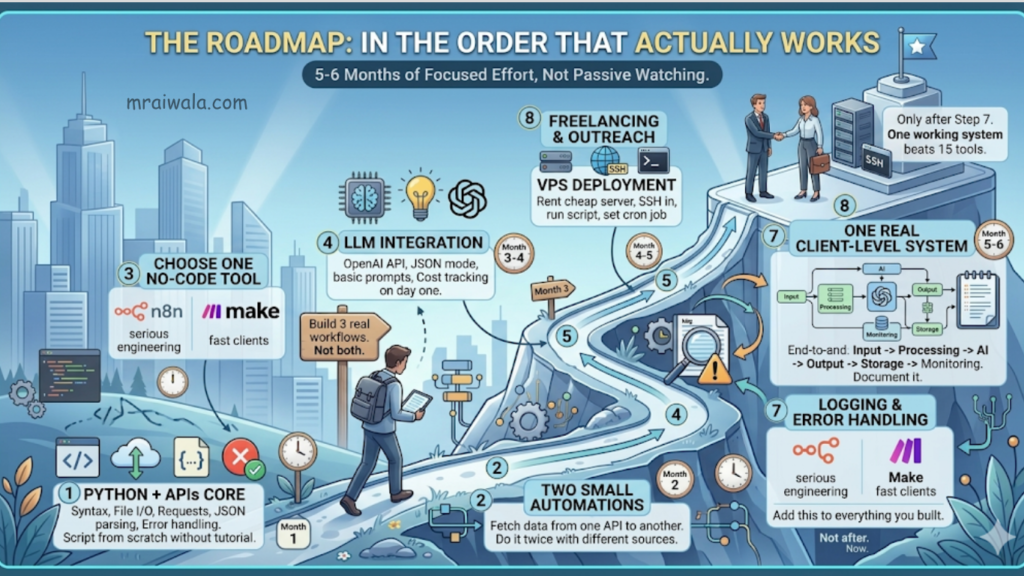
Most roadmaps list everything horizontally, as if Python and Docker and Zapier all need equal attention at the same time. They don’t.
Step 1. Python + APIs core syntax, file I/O, requests, JSON parsing, and error handling. Don’t move until you can write a script from scratch without a tutorial open.
Step 2. Two small automations fetch data from one API and write it somewhere else. Do it twice with different sources and outputs.
Step 3. One no-code tool, n8n, if you’re serious about engineering. Make it if you need clients fast. Not both. Build three real workflows.
Step 4. LLM integration OpenAI API, JSON mode, basic prompt structure. Add cost tracking on day one.
Step 5. VPS deployment: rent a cheap server, SSH in, run your script there, set a cron job. This step alone separates most people from stalling indefinitely.
Step 6. Logging and error handling add this to everything you’ve already built. Not after. Now.
Step 7. One real client-level system end-to-end. Input, processing, AI, output, storage, monitoring. Document it. This is your portfolio.
Step 8. Freelancing and outreach only after step 7. One working system beats fifteen tools on a profile page.
Five to six months of actual focused effort. Not passive watching.
The Actual Skill Stack: What Matters and In What Order
Python and APIs
If you can’t read and write Python reasonably well, almost nothing else in this list scales. You don’t need to be a software engineer. But you need to be able to look at an API response, parse a JSON object, loop through it, write the output somewhere, and catch errors when something breaks.
The failure point here isn’t ability. It’s confidence. Most people learn enough Python to follow tutorials, but can’t write something from scratch when there’s no template. That gap is where clients lose trust in you.
Struggling with Python basics? Python Crash Course will get you to “build from scratch” faster before you move to real systems. Check latest price on Amazon: United States | India
What to focus on: REST API calls, JSON parsing, error handling with try/except, writing to CSV, and Google Sheets. What to ignore for now: Async Python, classes, and decorators. They’ll make sense when a real problem demands them.
Do this before moving on:
1 - Call any public API and print the full response2 - Parse the JSON and save three specific fields to a CSV3 - Deliberately break something wrong key, missing auth 4 - and write a try/except that catches and logs it cleanlyThe third one matters more than the first two. If you can’t read an error and understand what happened, you’re not ready for client work.
No-code tools with a caveat
Make, n8n, Zapier. Everyone knows these. And yes, they’re genuinely useful for building fast prototypes and for clients who want to maintain their own workflows. But here’s what I’ve seen go wrong repeatedly: people learn Make before they understand what’s happening underneath, get stuck the moment something breaks, and can’t debug it because Make hides complexity until it explodes.
n8n is more transparent than Make. Make it faster to learn. Zapier is for when a client insists on Zapier.
n8n runs on your own server if you want. For anyone serious about the engineering side, it teaches you to think about flows the way a developer does.
Constraint: n8n self-hosted costs $5–10/month on a VPS. Make has a free tier good enough to start. Failure point: building complex logic in Make without understanding webhook triggers, having it fail silently on edge cases with no useful error in sight.
Do this before moving on:
Build a workflow that watches a Google Sheet fornew rows and sends the data to a webhook. siteAdd an error path: What happens if the API fails?Read the workflow log after it runs If you can't read it, you can't debug itLLM integration not the same as prompt engineering
This is where the hype lives and where most people stop thinking clearly.
Prompt engineering is real. Knowing how to write a system prompt that consistently returns structured output is worth developing. But the actual engineering problem with LLMs is not the prompt.
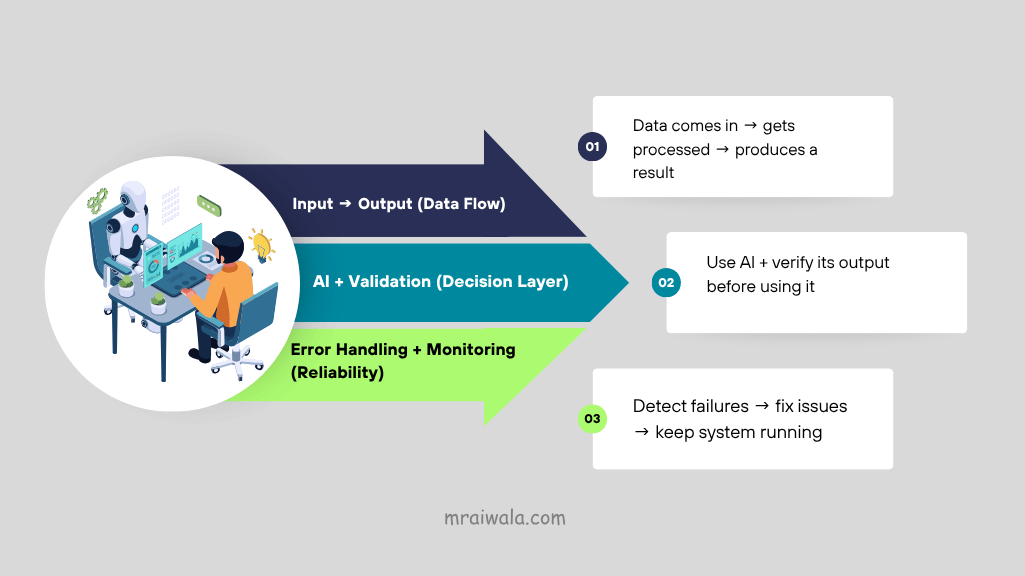
Prompt engineering is 30% of the problem. Validation, error handling, and cost control are the other 70%.
It’s context management. It’s knowing when your input is too long. It’s catching cases where the model returns something unexpected, and your code breaks because it was assuming a specific format.
OpenAI’s API is the standard reference point. At gpt-4o, roughly $5 per million input tokens, $15 per million output tokens, check current pricing, these shift. For a workflow processing 500 documents a day, the math adds up fast. I’ve seen setups rack up $300 in API costs in a week because nobody set a limit.
Do this before moving on:
Send text to OpenAI, ask for a JSON objectwith three specific fieldsIntentionally prompt it to return plain text instead A JSON handle that handles failure gracefully in your codeAdd a token counter, print a warning when You cross 10,000 tokens in a sessionReal engineering basics, the part most roadmaps skip
Git, environment management, Linux CLI, and debugging. These are not optional. They separate freelancers who retain clients from those who don’t.
Git is not for collaboration, for yourself. When something breaks three weeks after you built it, you need to know what changed. .env files for API keys, never pushed to GitHub. Virtual environments so project dependencies don’t collide. Knowing tail -f logs.txt while something runs on a server. Knowing how to check if your Python process is actually alive.
Debugging is a skill. Reading an error traceback, understanding what it’s telling you, knowing whether it’s a logic error, a network error, or a timeout, this is learned, not innate. The engineers who get retained are the ones who debug fast, not the ones who know the most tools.
Most people don’t fail. They can’t code, they fail because they can’t debug.
Do this before moving on:
Set up a project with venv, install one library,commit to GitHub with .env, example, and .gitignoreSSH into any server and run a Python scriptfrom the command lineBreak your script by removing a dependency, Read the traceback, fix it without Stack OverflowHow an Automation System Actually Flows
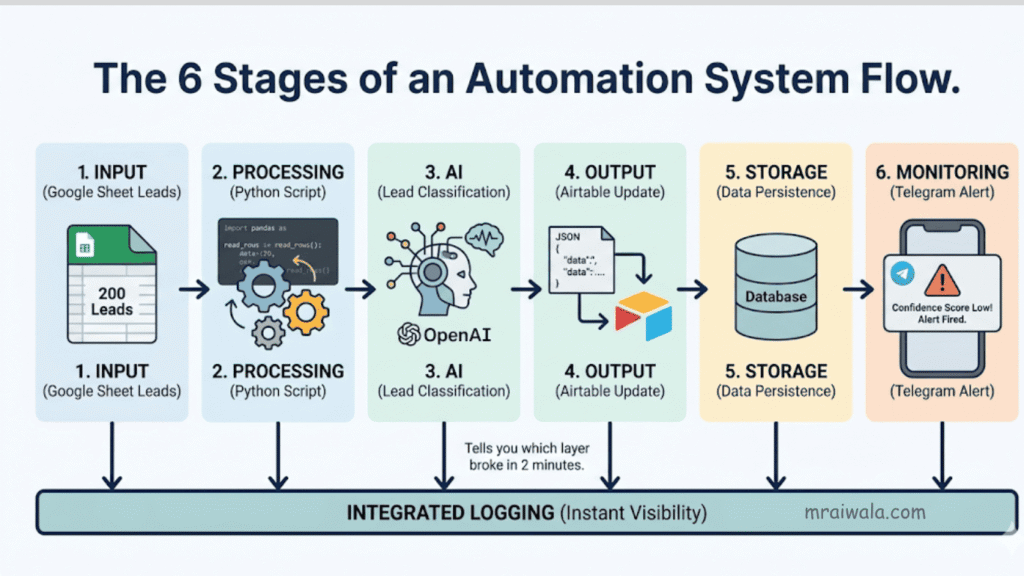
The real unlock in this work is being able to look at any business problem and see the system inside it. Once you can do that, the tools become secondary.
Every income-generating automation you’ll ever build maps onto the six-stage structure above. The diagram shows it. A concrete example running in production right now: Google Sheet with 200 leads → Python reads new rows → OpenAI classifies each lead → structured JSON writes to Airtable → Telegram alert fires if confidence score drops below 70%.
Input → Processing → AI → Output → Storage → Monitoring
Six layers. When it breaks, it breaks in one of them. Logging tells you which one in two minutes. Without logging, you’re guessing until the client messages you first.
Five Real Systems With Build Templates
1. Lead enrichment and CRM update automation
What it does: Takes lead data, runs it through an LLM to extract or infer details on industry, pain point, decision-maker level, and pushes it into HubSpot or Airtable.
Constraint: LinkedIn aggressively blocks scraping. Use Apify ($50–$150/month extra), work with data the client already owns, or stay in a grey zone. For Indian SME clients, start with the data they already have: email lists, old spreadsheets, inquiry forms.
Trade-off: LLM classification is only as good as your validation layer. The model will return null, format a field incorrectly, or hallucinate a value. Write directly to a live CRM without checking, and the client has corrupted data.
Failure point: One bad entry corrupts a field across 200 records. Client panics.
What becomes obvious: Build a review layer. Human eyes, before anything writes to a live system.
Minimum build stack:Input: Google Sheets (lead list)Processing: Python reads rows, basic cleaningAI: OpenAI API classify industry + intentOutput: Airtable write enriched recordTrigger: Cron job runs daily at 8 amMonitor: Log errors to file, Telegram alert on failure2. AI-powered content pipeline
What it does: Takes topics from Google Sheets, generates drafts using an LLM, checks basic quality rules, and sends them to a human for review.
Constraint: Works well for templated content product descriptions, FAQs, updates. Breaks for anything requiring original thinking or a brand voice that’s hard to encode in a system prompt.
Trade-off: Faster and cheaper than a content agency for volume. Worse than a good writer in terms of quality. The right model is a hybrid LLM, first draft, human review, and human publishes.
Failure point: You auto-publish. One bad output goes live. Retainer ends.
What becomes obvious: Never auto-publish. Human checkpoint on every client-facing pipeline.
Minimum build stack:Input: Google Sheets (keyword + topic list)Processing: Python read row, format promptAI: OpenAI API generates a draft, check lengthOutput: Gmail API sends draft to human reviewerTrigger: Cron (3x per week)Monitor: Log token usage, alert if quality check fails3. WhatsApp or Telegram customer support bot
What it does: Handles common queries using an LLM with a defined knowledge base, escalates to a human when it can’t answer.
Constraint: WhatsApp’s official API costs per conversation. For Indian SMEs, Telegram bots are often cleaner, cheaper, stable, and easier to build. WhatsApp has users, but the infrastructure headache is real.
Failure point: LLM hallucinates a pricing answer. The customer gets the wrong information.
What becomes obvious: Constrain the knowledge base tightly. Build a clean fallback. Fewer capabilities, less risk.
Minimum build stack:Input: Telegram Bot API incoming messageProcessing: Python route query typeAI: OpenAI API answer from knowledge baseOutput: Telegram reply or escalate to a humanTrigger: Webhook (real-time)Monitor: Log all queries, flag unanswered ones daily4. Document processing automation
What it does: Takes PDFs from email or a folder, extracts structured data using an LLM, and writes to a spreadsheet or database.
Constraint: PDF extraction is messy. Tables, scans, and non-standard formatting all break naive approaches. Scanned documents need OCR first. Handwritten forms are a different project scope that is considered separately before quoting.
Failure point: Numbers extracted incorrectly from an invoice. Client processes a wrong amount. This ends client relationships.
What becomes obvious: For anything financial, add a human verification step. Tell the client upfront what document quality you require.
Minimum build stack:Input: Gmail API watch for PDF attachmentsProcessing: Python + pdfplumber extract textAI: OpenAI API parse fields into JSONOutput: Google Sheets writes extracted dataTrigger: Cron job (every hour)Monitor: Flag low-confidence extractions for review5. Internal reporting and alerting system
What it does: Pulls data from multiple sources, summarizes it, and sends a weekly report to Slack or email.
Constraint: The complexity is in the data pipeline authentication across multiple platforms, normalisation, and handling missing data. The report generation is the easy part. The wiring is where the hours go.
Failure point: One API changes its response format. The pipeline breaks silently. Client messages at 9 am asking why the report didn’t arrive.
What becomes obvious: Monitor your own automations. A health-check script that confirms the report was sent and alerts you if it wasn’t takes an hour to build.
Minimum build stack:Input: Google Analytics API + CRM APIProcessing: Python fetch, merge, normaliseAI: OpenAI API summarise highlights + anomaliesOutput: Gmail / Slack formatted weekly reportTrigger: Cron job (Monday 7 am)Monitor: Confirm delivery, alert if pipeline errorsDeployment: The Part People Skip
You can build something that runs perfectly on your laptop. It means nothing if it can’t run without you.
A system that requires you to babysit it is not a system. It’s a dependency.
Clients don’t pay for automation. They pay for reliability.
A VPS Digital Ocean, Hetzner, Hostinger (I personally use Hostinger for simple setups) ₹500–₹1,500/month. SSH in, run your script, set a cron job, log the output. Error logging is not optional. A Telegram bot that pings you when exceptions happen takes two hours to set up and will save you from difficult client calls more than once. Every API key in a .env file that never touches GitHub. Docker comes later, when you’re managing multiple clients on the same server and dependency conflicts start causing problems.
Start with Hostinger the easiest way to get your VPS running → Start here
Do this before you call anything deployed:
SSH in, run the script manually, and watch it succeedSet a cron job, wait for it to fire, check the logKill one dependency, confirm the error gets logged , and you get notifiedOnly then call it doneThe midpoint compression:
The stack is not the job. The job is keeping systems alive that were supposed to run without you.
What to Charge: Three Exact Offers
These are real prices being charged in the Indian market right now, not theoretical numbers.
Most people undercharge because they don’t know what the market actually looks like. Here are three real pricing tiers, not aspirational ones.
Offer 1 ₹15,000 to ₹25,000: The Single Automation
One specific problem. One working solution. Fixed scope, fixed price, delivered in 7–14 days. Examples: a Telegram bot that answers FAQs, a lead classifier that writes to Airtable, a document parser that extracts invoice fields to a spreadsheet.
This is your entry offer. Not because the work isn’t worth more, but because a first-time client needs a small yes before a big one. Deliver this well, and the conversation shifts.
Offer 2 ₹40,000 to ₹80,000: The End-to-End System
Input, processing, AI, output, storage, monitoring. Deployed on a VPS. Documented. With a 30-day support window. This is what a client pays when they want something that actually runs in production, not a script they have to manage themselves.
Most of the five systems listed in this article fall in this range, depending on complexity. Two or three of these per month is a full income.
Offer 3 ₹25,000 to ₹50,000/month: The Retainer.
You own the system. You watch it. You fix it when it breaks. You update it when the client’s needs change. This is where the income becomes stable, and the relationship becomes long-term.
The retainer comes after Offer 1 or 2. You deliver something, it works, and the client realizes they want someone who understands their system to keep watching it. That’s the conversation.
These three offers are a progression, not a menu. Most clients start at Offer 1 and move to Offer 3 over time.
How the First Client Actually Happens
There’s no elegant version of this. Here is the plain one.
Most people wait for the client to find them. They build a portfolio, update their LinkedIn, list their skills on Upwork, and wait. That works eventually. But it’s slow at the start when your profile has no history.
First client shortcut:
Start with a local business you can observe directly. A coaching institute, a clinic, a real estate agency, a small e-commerce shop. Watch how they work for a few days. What do they do manually that repeats? Where does someone spend two hours doing something a script could handle in five minutes?
Common ones in Indian SMEs: manually copying inquiry form data into a spreadsheet, sending follow-up messages by hand to enquiries that came in three days ago, generating weekly reports by pulling numbers from three different places, and sorting customer support messages before forwarding them.
Pick one problem. Build a partial demo, not the full system, just enough to show the idea working. Show them the before and after. Don’t pitch AI. Pitch time saved.
Offer to build the full version. ₹15,000–₹25,000 for something simple is a reasonable starting point. The goal of the first project is proof, not profit.
The thing that closes the first client is not your portfolio. It’s that you understand their specific problem better than they expected a stranger to.
The Hiring Signal Most People Miss
Companies hiring in 2026 are not evaluating whether you know Python. They assume that. What they’re actually evaluating: can you understand a business problem and translate it into a working workflow without being hand-held? When it breaks, will you fix it fast and tell them what happened?
The technical bar is real but lower than people think. The reliability bar is higher than most expect.
I’ve lost clients not because my automation didn’t work, but because I was slow to respond when something broke. I’ve kept clients not because I built the most sophisticated system, but because they knew I was watching it. That distinction is the whole job.
One Last Thing
You don’t become an AI automation engineer by finishing a course, knowing the right stack, or having the title in your bio.
You become one when you build something that runs at 3 am without you processing real data, hits an edge case you didn’t plan for, logs the error cleanly, and keeps going. And when it does fail, you know exactly where to look. You fix it in twenty minutes. You write the one-line change that stops it from happening again.
The system that works when you’re not watching is the proof.
Build this today:
Open a terminal. Call any public API. Parse the response. Save three fields to a CSV. Handle the error when it breaks. Run it again.
That’s the first hour. In the second hour, do it again with a different API and write the output to Google Sheets instead.
That’s it. Not a roadmap item. Not a checkbox. Just a script that works, that you wrote yourself, without following anyone.
Everything else follows from that.
Related Posts 📌
AI Engineer vs Data Scientist (2026): Salary, Skills & Demand

