


For two years, I kept giving clients the same advice:
“Automate your lead follow-up.”
I said it with confidence. Added it to proposals. Built it into onboarding decks. Treated it like settled advice, the kind you repeat without questioning because it worked once and nobody pushed back.
Then a consulting client spent ₹40,000 doing exactly that.
Zapier. HubSpot. AI email sequences. Four weeks of setup.
Their leads still dropped off.
Not because the automation failed.
Because nobody had defined what a good lead actually looked like.
Their intake form collected garbage data. Their salesperson was spending 40% of her week figuring out who was even worth calling.
The automation just made the chaos faster.
That was the moment I started questioning how most small businesses were buying AI tools and why so many of them quietly fail inside real operations.
The pattern I kept seeing: businesses buying AI tooling at the wrong maturity level. Enterprise-grade software before they had enterprise-grade process complexity. Paying for autonomy when what they really needed was a reliable trigger, a clean workflow, and data they could actually trust.
That gap between what’s being sold and what’s actually needed is where most of the money gets wasted.
Before we get into the systems, most “AI agents” aren’t what they say they are
This matters because people are buying the wrong thing and then blaming AI when it fails.
An actual AI agent makes decisions, takes actions, and adjusts based on outcomes. Goal-driven. Dynamic. It can do things like: monitor your inbox, identify a sales opportunity, draft a response, check calendar availability, and send a follow-up without you triggering each step.
Most tools being sold right now as “AI agents” are:
- Chatbots with better UI
- Zapier workflows with GPT-4 in the middle
- Prompt templates dressed up with an interface
- AI assistants that remember your name
None of these is bad. Some are genuinely useful. But they’re not agents. They’re tools. And buying them, expecting agent-level autonomy, is how businesses end up frustrated and underusing ₹15,000/month in software.
The practical difference: a tool responds when you ask. An agent acts when conditions are met.
Most SMBs don’t need the second thing yet. What they actually need is reliable semi-automation triggers that fire consistently, templates that don’t embarrass you, and structured workflows with a human review step built in. Not autonomy. Predictable execution. That’s the real goal, and it’s achievable without anything exotic.
Who should probably stop reading here?
If your team isn’t using your CRM consistently, stop. Fix that first.
If you don’t have written SOPs for your core processes, stop. Not because AI needs documents, but because you do. You need to know what you’re automating before you automate it.
If you’re running less than 50 inbound leads a month, or your support volume is low enough that one person handles it without burning out, the ROI on most of these systems won’t show up in any timeframe that matters.
If you’re looking for something that removes all operational thinking from the equation, that’s not what’s here.
This is for businesses past that point. Teams that have some systems, some volume, some repetitive friction, and are trying to figure out which AI investments will actually reduce load versus which ones will just move the complexity somewhere else.
One more thing worth saying plainly: AI amplifies operational quality. It rarely fixes operational chaos. If your operations are messy, automation makes them messier and faster. That’s not a warning against AI. It’s a warning about the sequence.
What makes sense at different business stages
Most articles say “some businesses are too early for AI.” Then they don’t explain what too early actually means.
Here’s a rough map. Not perfect. But honest.
| Stage | Where are you actually | Systems that make sense |
| Solo founder | Doing everything yourself, no team | Admin assistant, content repurposing |
| Small team (3–10) | Some volume, repetitive work starting to pile up | FAQ support layer, basic CRM cleanup |
| Growing team, ops-heavy | Processes exist, but knowledge lives in people | Knowledge assistant, reporting automation |
| High lead volume | Lead sorting and follow-up consume real hours | Qualification system, sales follow-up automation |
The signal that you’ve moved from one stage to the next isn’t headcount. It’s friction. When a specific type of work starts costing you disproportionate time every week, that’s the signal. That’s the workflow worth automating first.
Which system should you start with?
Pick the one that matches your most expensive bottleneck right now. Not the most interesting one. The most expensive one.
| If your real bottleneck is | Start here |
| Repetitive support queries are eating team time. | FAQ Support Layer |
| Inconsistent lead quality, manual filtering | Lead Qualification |
| Knowledge living in people’s heads | Internal Knowledge Assistant |
| Founder doing all the content, and nothing gets published | Content Repurposing Engine |
| Leads are going cold because follow-up is inconsistent | Sales Follow-Up Automation |
| Reports are taking too long to build | Reporting Automation |
| Admin overhead quietly drains your week. | AI Admin Assistant |
The 7 systems. What they actually are, what they cost in real terms, and where they break.
System 1 Lead Qualification
What it actually is: A filter between your lead source and your sales team. Not more, not less.
The workflow sounds simple: lead submits a form → AI scores or categorizes the lead → CRM is updated → follow-up is triggered or suppressed.
In practice, it requires your form to collect the right data, your scoring criteria to be defined (by you, not AI), and your CRM to be clean enough to accept structured inputs without creating duplicate records.
What does a scoring criterion actually look like? Something like: company size above a certain threshold, budget range mentioned, geography within your service area, urgency signal in their message, and service fit based on what they described. Five criteria, written down. That’s your filter. Without it, the AI is scoring against nothing.
Constraint: Setup time is usually 2–3 weeks if done properly. Ongoing maintenance, updating scoring criteria as your ICP shifts, is real work. Not huge, but real.
Cost anchor: For a small team, expect to pay somewhere between $50–150/month across tools (Zapier or Make, a CRM like HubSpot or Zoho, and OpenAI API calls). The real cost is your time in the first month.
Trade-off: This works well when your leads have enough variation that filtering saves meaningful time. If your salesperson is spending even 6–8 hours a week manually sorting leads, this system typically pays for itself within the first month. If 80% of your leads are already qualified, you’re automating something that didn’t need automating.
What success actually looks like: Salespeople spend less time sorting and more time talking. The inbox has fewer “is this worth calling?” decisions. Qualified leads get a response faster because they’re not buried under unqualified ones. Nothing dramatic, just cleaner mornings.
Failure point: Garbage intake data. If people fill your form incorrectly or skip fields, the AI scores based on nothing, and your “automation” is just noise routed faster.
What becomes obvious: Define what a good lead looks like before touching any tool. Write it down. Four to five criteria. That list is the actual system. The software is just the execution.
System 2 Customer Support FAQ Layer
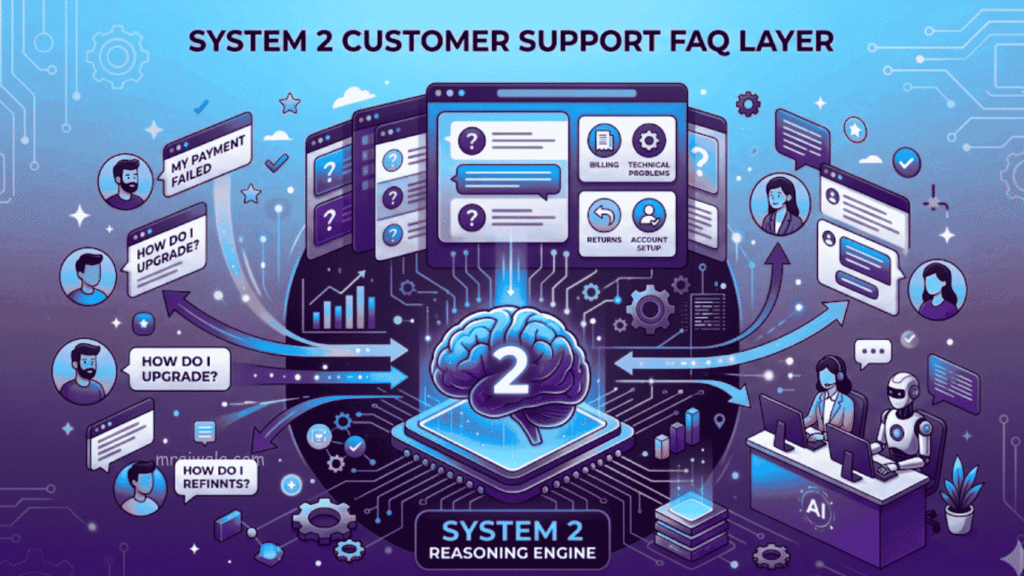
This one has the highest success rate I’ve seen, and the clearest failure mode.
What it actually is: A layer that handles your 10–15 most common support questions automatically, escalates anything else to a human.
Not a chatbot that “understands everything.” A well-trained, narrow responder. The difference matters.
Who it’s for: Businesses getting 30+ repetitive support queries a week, onboarding questions, order status, pricing FAQs, and appointment confirmations. If you’re in ecommerce, edtech, or services with recurring client questions, this is probably your highest-ROI starting point.
Constraint: You have to write the content. AI can’t invent accurate answers. Your FAQs, your onboarding docs, your policies, these need to exist, be correct, and be organized. Most businesses have this content scattered across emails, WhatsApp, and someone’s brain.
The hallucination problem: This one needs to be said directly. LLMs can confidently generate incorrect answers when the underlying source documents are incomplete or ambiguous. It doesn’t hesitate. It doesn’t flag uncertainty. It just answers, sometimes wrongly. This is why narrow, well-documented systems work, and broad, ambitious ones fail. The more you restrict what the AI is allowed to answer, the safer it is.
Cost anchor: Intercom starts around $74/month. Zendesk is comparable. There are leaner options, Tidio, and Crisp in the $20–50/month range that work fine for smaller volumes. You don’t need the expensive option to start. If this handles even five repetitive tickets a day, most tools pay for themselves within the first few weeks.
What success actually looks like: The goal isn’t full automation. It’s reducing repetitive ticket load enough that your support team can focus on edge cases, the complex, sensitive, or high-value conversations that actually need human judgment. When this works, support response time drops for common queries, and your best support person stops spending half their day answering the same five questions.
Trade-off: This reduces the repetitive load on your team. It does not improve support quality for complex issues. Trying to use it for both, that’s where trust gets damaged. A bad AI support response to a frustrated client is worse than a slow human response.
Failure point: Overconfidence. Businesses deploy this, stop monitoring it, and discover three months later that the AI has been giving outdated pricing information or wrong policy answers because something changed and nobody updated the source documents.
What becomes obvious: This is maintenance work, not a one-time setup. If you’re not willing to review it quarterly, keep it narrow and keep a human in the loop faster.
What should stay human: Angry customer escalations. Situations where someone is upset enough that they need to feel heard by a person. No AI support layer handles this well, and trying to automate it damages the relationship in ways that take a long time to repair.
System 3 Content Repurposing Engine
I’ll be honest, this one took me the longest to take seriously, because it sounds like a content marketing luxury.
It isn’t. For consultants, agencies, or founder-led businesses where the person with the most expertise is also the person with the least time to write, this has genuine operational value.
What it actually is: You write or record something once. A long-form article, a podcast episode, a client presentation. The system breaks it into LinkedIn posts, an email, a short thread, maybe a short video script. Not perfectly. But usably.
One thing that doesn’t get said enough: repurposing is format adaptation, not copy-pasting. What works as a 1,500-word article does not work as a LinkedIn post. The structure is different, the hook is different, and the length is different. LinkedIn rewards directness and short paragraphs. Email rewards context and continuity. Trying to use the same content shape across both is why most repurposed content feels flat. A good repurposing workflow accounts for this. A lazy one just shortens the original and wonders why engagement drops.
Constraint: The output needs editing. Always. Anyone selling you a fully autonomous content repurposing system where you don’t touch the output is selling you something that will embarrass you eventually. Budget 20–30 minutes of editing per repurposed piece.
Cost anchor: Claude or ChatGPT subscription (₹1,500–2,000/month). Notion AI, if you’re already in that ecosystem. A simple Make or Zapier workflow if you want it triggered automatically. Total: under ₹5,000/month for a working setup.
What success actually looks like: A founder who was publishing once a month is now publishing twice a week, not because they’re writing more, but because they’re using what they already produced. The backlog of value that was locked in call recordings and old proposals starts becoming actual content.
Failure point: Using it to produce volume instead of clarity. Businesses start generating 15 LinkedIn posts a week because they can, and the quality drops to the point where it stops working as marketing.
What becomes obvious: Most businesses have more usable content than they think, such as old proposals, client Q&As, and recorded calls. Start with what already exists before creating anything new for this system.
System 4 Internal Knowledge Assistant
This is the most underrated one on this list. Also, the hardest to sell to leadership because the ROI is invisible until you feel the absence of it.
What it actually is: Your SOPs, onboarding docs, process guides, and policies uploaded to a tool that your team can query in plain language. Instead of asking a senior person, “How do we handle refund requests?” they ask the system.
Tools like Notion AI, Guru, or a custom GPT with uploaded documents can do this. It’s not complicated to set up.
Who it’s for: Teams past 5–6 people, where knowledge is starting to live in individuals instead of systems. Growing businesses where onboarding new hires is taking up senior time that it shouldn’t.
The operational effects are specific: fewer Slack messages interrupting senior people mid-work, new hires becoming independently useful faster, processes followed more consistently because the answer is findable in 30 seconds instead of requiring a conversation. These things don’t show up on a dashboard. But if you’re a founder who gets three “quick questions” a day that each takes 10 minutes to answer, you feel them.
What success actually looks like: A new hire in week two can answer their own questions without pinging anyone. Senior people stop being the human FAQ. Onboarding time shrinks not dramatically, but meaningfully. The knowledge that used to leave when someone left the company starts staying.
Constraint: The quality of the system is entirely dependent on the quality of your documentation. If your SOPs are incomplete, outdated, or don’t exist, this doesn’t help. It just gives fast access to wrong information.
Failure point: Trusting it completely. New employees, especially, will assume the AI is right. If your documentation has gaps or errors, those get encoded as fact.
What becomes obvious: The actual work is documenting your operations, not setting up the AI. The tool takes half a day. The documentation takes weeks. If you’re not ready to do that, skip this for now.
System 5 Sales Follow-Up Automation
Back to where I started.
I still recommend this. I just recommend it differently now.
What it actually is: When a lead enters your CRM, a sequence starts. Emails go out at defined intervals. Tasks get created for the salesperson. Reminders trigger. The AI can draft the emails, personalize them slightly based on lead data, and suggest next steps.
Constraint: This requires your CRM to be the actual source of truth for leads. If your team is still tracking leads in WhatsApp or Excel, this will not work. You’ll be automating a system that doesn’t reflect reality.
Cost anchor: HubSpot’s starter plan is around $20/month. Zoho CRM has a free tier that’s usable for small teams. The automation layer, Zapier or Make, adds another $20–50/month. If you’re using AI to draft emails, add API costs, usually modest.
Trade-off: Automated follow-up sequences can feel impersonal. For high-value B2B deals, impersonality is a problem. This system works better for higher-volume, lower-ticket sales where the marginal follow-up email is worth more than the personalization cost.
The deliverability problem: AI-written sequences, especially when they over-personalize badly or use templated openers that every other automated email also uses, often land in spam. Or they don’t land in spam but feel like they should, and the reply rate tanks. The fix is simpler, emails are shorter, plainer, and more direct. Counterintuitive when you’re trying to use AI to make things better, but that’s how it works.
What success actually looks like: Leads stop going cold because someone forgot to follow up. The follow-up happens consistently, at the right intervals, regardless of how busy the salesperson is that week. It’s not magic. It’s just reliability, which turns out to be most of what was missing.
Failure point: Automating before defining the sequence. Businesses set this up without deciding: how many touchpoints, what cadence, what triggers escalation to a human, when to stop. AI fills in the gaps with generic behaviour, and generic follow-up is often worse than no follow-up in terms of brand perception.
What should stay human: High-ticket negotiation. Any conversation where the deal depends on trust built through real communication. Automating that final push in a ₹10–20 lakh deal is usually a mistake.
Here is the compression: Most AI automation failures are CRM failures. Fix your data before touching your workflow.
System 6 Reporting & Analytics Automation
What it actually is: Pulling metrics from your tools weekly or monthly, having AI summarize the key movements, and generating a simple report. Instead of a marketing person spending 3 hours building a deck, they spend 30 minutes reviewing one.
Who it’s for: Agencies, ecommerce businesses, SaaS teams, and anyone producing regular reports for internal review or client delivery.
Cost anchor: Looker Studio is free. Make or Zapier handles the automation layer. If you’re using GPT-4 to summarize, API costs are usually low, a few dollars a month for this volume.
The important limitation: AI can summarize correlation, not causation. It can tell you that conversions dropped 18% last week and that it happened alongside a spike in bounce rate. It cannot tell you why. That interpretation of the actual strategic insight still requires a human who understands the context. Businesses that expect automated reports to replace analysis end up with faster summaries of things they still don’t understand.
What success actually looks like: Reporting delay shrinks. The weekly numbers that used to arrive on Thursday are now too late to act on and land on Monday morning. The team spends less time compiling and more time discussing. That’s the actual value. Not replacing strategic thinking, just giving it better, faster inputs.
Failure point: The AI summarizes what the data says, not what the data means. If your metrics are tracking the wrong things, a faster summary of the wrong things is not useful.
What becomes obvious: Before automating reporting, decide what decisions these reports are supposed to support. If you can’t answer that, no reporting system, automated or not, will help.
System 7 AI Admin Assistant
This one is last because it’s the most personal and the hardest to generalize.
Meeting summaries. Task extraction from calls. Scheduling assistance. Email drafts. The quiet overhead that doesn’t show up in any productivity metric but quietly takes 1–2 hours a day from people who should be doing other things.
The real value here isn’t transcription. Anyone can record a meeting. The value is reducing the cognitive residue after meetings, that mental fog of trying to remember what was decided, who owns what, and what needs to happen by when. A good summary with extracted action items clears that residue in two minutes instead of thirty. For people running 4–6 meetings a week, that compounds into something real.
Tools like Otter.ai for transcription, ChatGPT or Claude for summarization and drafting, and Calendly for scheduling cover most of this.
Constraint: Works best for people who are in a lot of meetings or produce a lot of communication. For a founder running a small team with 3 external calls a week, the setup cost exceeds the time saved.
What success actually looks like: You stop leaving meetings unsure of what was decided. Action items actually get assigned and followed up on. The 45-minute call that used to produce a vague email thread now produces a clear, shared record in five minutes.
What becomes obvious: Try the free tier of one tool for 30 days before buying anything. Either the habit forms and the time savings are obvious, or it doesn’t stick. Don’t pay for it speculatively.
Why Most AI Agents for Small Businesses Fail in the First 90 Days
Not because AI is bad. Because of a set of problems that rarely get mentioned in product demos.
The data problem: Messy data fed in, messy output comes out. Triggers don’t fire correctly because the process they’re supposed to follow doesn’t exist in a clean enough form.
The integration fragility problem: APIs break. Zapier tasks fail silently, and that last part is the real issue. Silent failures. A workflow stops working, and nobody knows for two weeks because the error doesn’t surface anywhere visible. CRMs desync. Permissions change after a tool update. These aren’t edge cases. They happen regularly, and the businesses that handle them well are the ones with someone assigned to check system health periodically.
The hidden maintenance cost: This deserves more than a mention. After setup, most AI systems require ongoing work that nobody budgets for. Prompts drift, what worked six months ago stops producing useful output because the underlying model was updated, or your process changed. Documentation decays the SOPs your knowledge assistant relies on, becoming outdated as your business evolves, but nobody updates them because it’s not anyone’s job. API pricing changes.
Workflows need updating every time a connected tool changes its interface. Staff turns over, and new people need retraining on systems the previous person built. A conservative estimate: budget 2–4 hours a month per active system for maintenance. If that time doesn’t exist, the system will quietly degrade.
The adoption problem: This one doesn’t get talked about enough. AI systems fail because sales teams ignore the CRM, support teams bypass the workflow, and founders revert to WhatsApp because it’s faster.
Technology failure and human adoption failure look identical from the outside, but have completely different fixes. Building a system nobody uses isn’t an AI problem. It’s a change management problem.
The expectations problem: Someone sets it up expecting autonomy, gets semi-automation, and calls it a failure. These systems need someone to own them.
Not full-time. But someone who checks them, updates prompts when the process changes, and notices when something is silently misfiring. Name that person before you build the system.
When AI systems quietly stop working
Silent failure is the most expensive kind. The system runs. No errors. But the output is wrong, or the workflow is broken, or the data isn’t flowing, and nobody knows for weeks.
Here’s what this actually looks like in practice:
Someone renames a CRM field from “Lead Source” to “Source Channel.” The automation that was reading that field stops populating correctly. Leads still come in, still get assigned, but the scoring is based on nothing. Salespeople start noticing that the quality feels off. It takes three weeks to trace it back to a field rename.
A webhook between your form tool and your CRM gets disconnected after a software update on either end. Forms keep submitting successfully. Nothing reaches the CRM. The confirmation email still goes out, so clients think the process worked. Internally, leads are disappearing. Nobody notices for ten days because the volume looks normal from the outside.
Your AI support bot was trained on docs from eight months ago. Since then, your pricing has changed, your refund policy has changed, and you added two new service tiers.
The bot is still answering confidently, just incorrectly. Clients are getting wrong information, and most don’t push back on it. They just don’t convert.
Your email follow-up sequences have been running for six months. Gradually, reply rates have dropped. Not dramatically, just slowly, steadily down. The emails themselves haven’t changed. But your domain reputation has softened from months of low engagement and a few spam flags. Nobody connected the pattern.
These are the real failure modes. Not dramatic crashes. Quiet drift.
The only real protection is a monthly check by someone who deliberately looks at each system, verifies that outputs look right, and confirms the data flowing through matches what’s expected. It’s not sophisticated. It’s just discipline.
What probably shouldn’t be automated
This is the part most AI articles skip because it makes the tools sound limited. But it’s actually what makes advice trustworthy.
Keep humans directly in the loop for: angry customer escalations where someone needs to feel heard, high-ticket sales negotiations where the deal depends on a real relationship, sensitive client onboarding where first impressions matter, and any strategic communication where the nuance of your judgment is the product.
None of these is an exotic situation. Most businesses encounter them weekly. Automating them to save time usually costs more in relationship damage than the time was worth.
The question most people don’t ask before buying
“Will this reduce complexity or add to it?”
Not “is this impressive” or “does this save time theoretically,” but after this is running, will we have fewer moving parts or more?
Most AI tools add integrations, dependencies, and maintenance surfaces. Sometimes that tradeoff is worth it. Often it isn’t. And a lot of businesses are discovering this after signing annual contracts for enterprise-grade tooling that their operations weren’t mature enough to use properly.
The businesses I’ve seen handle this well are using fewer tools more completely. They’re not chasing every new thing. They picked two or three systems, built them properly, and the compounding effect over 12 months is meaningful. Not dramatic. Meaningful.
Before You Spend Money on AI, Answer These 5 Questions First
Not as a checklist. As a filter that prevents expensive mistakes.
1. What exact problem are we solving?
Not “we want to be more efficient.” Specifically:
- What task?
- How many hours per week?
- Which person or team is affected?
If the problem is vague, the ROI usually is too.
2. Is our process clean enough to automate?
If your CRM is inconsistent, your workflows live in WhatsApp, or your SOPs only exist in someone’s head, automation usually makes the chaos faster.
A well-documented workflow matters more than an advanced AI model.
3. Who owns maintenance after setup?
Not set up. Maintenance.
Who checks the workflows monthly, updates prompts when processes change, fixes broken integrations, and catches silent failures before they become expensive?
Most AI systems don’t fail dramatically. They fail quietly.
4. Will this reduce complexity or add to it?
After this tool is running:
- Will there actually be fewer moving parts?
- Or just more dashboards, integrations, subscriptions, and dependencies to manage?
The AI systems that last are usually the least impressive in demos.
5. How much can we trust the output?
AI can sound confident while being wrong. That matters more than people expect when the system touches:
- Customer communication
- Pricing
- Reporting
- Onboarding
- Sales follow-up
The more decisions the AI makes on its own, the more expensive mistakes become.
If you can’t answer these five clearly, the system probably isn’t ready to build yet. That’s not a failure. It’s usually a sign that the operational foundation needs work before another tool gets added on top of it.
If you only do one thing
After all of this, some people still want a single answer. Fair enough.
For most SMBs, the best first AI investment isn’t an agent. It isn’t even a workflow. It’s cleaning your operational data and automating one repetitive workflow completely, not partially, not experimentally, but properly, with an owner and a maintenance schedule.
One workflow. Documented. Owned. Monitored.
That single thing, done properly, will teach you more about what AI can and can’t do for your business than six tools running half-heartedly. And it will compound. A clean system that actually works becomes the foundation the next system runs on.
That’s not a satisfying answer if you came here looking for a transformation. But it’s the one that actually leads there.
You probably came here with a specific decision in your head. Maybe it’s whether to spend ₹50,000 on an AI automation setup someone pitched you last week.
Maybe it’s whether your support inbox problem is actually an AI problem or a process problem. Maybe you already bought something, and it’s sitting there, half-configured, and you’re not sure whether to push through or cut losses.
There’s a tab open somewhere on your browser right now. A tool you bookmarked. A demo you half-watched.
It’s been open for two weeks.
Read This Next 📌
From $0 to $1K/Month With AI Automation in 90 Days (Exact Workflow)
AI Engineer vs AI Automation Engineer (2026): Which Career Wins?
