

Wrong service. Wrong pricing. Too much learning, not enough earning.
I made those mistakes early. I jumped between ideas, kept tweaking offers, and spent more time learning than actually getting paid.
So I tested it properly. Seven AI freelancing services, same effort, same time, same goal: consistent income.
Only two worked.
Not because they were better tools, but because they matched where I was, how I sold, and what clients actually paid for.
This isn’t another list of AI freelancing services. It’s a breakdown of what actually makes money, what wastes your time, and how to reach your first $1K/month without guessing.
Quick Reference
| Service | Monthly Range | Difficulty | Speed to First Client | Client Retention |
| Content + SEO Writing | $300–$715 | Low | 2–4 weeks | Medium |
| AI-Enhanced Web Design | $415–$715/project | Low-Medium | 3–5 weeks | Low (project-based) |
| Video Repurposing | $475–$775 | Medium | 2–3 weeks | High |
| Business Automation | $415–$715/project | Medium | 4–6 weeks | High (maintenance) |
| Custom Chatbots | $1,200–$4,200 + retainer | Medium | 4–6 weeks | High |
| Sales & Lead Bots | $3,000–$9,500/project | High | 6–8 weeks | Very High |
| Personalized Marketing | $1,200–$2,400+/month | High | 8–10 weeks | Very High |
Before the Services: Which One Should YOU Choose?
This is the section I wish had existed when I started. Every “AI freelancing” article lists the services and tells you they’re all great. None of them tells you which one makes sense for where you are right now.
Here’s how to decide honestly, not aspirationally.
If you’re starting from zero (no clients, no portfolio, under $180/month from freelancing)
Your only job right now is to close one paying client and produce one result you can show. That’s it. Nothing else matters.
That narrows it to two services: Content + SEO Writing or AI-Enhanced Web Design.
Content writing has the lowest barrier. You can start with a free stack (ChatGPT + Google Search Console + Ubersuggest), and your first “case study” can be a test site you built on Medium or WordPress yourself. Web design takes slightly longer to set up but pays $415–$715 per project, which means one client covers a decent month.
Don’t touch automation or chatbots yet. Not because they’re too hard. Because the sales cycle is longer, clients need to trust you before they hand you access to their business systems. You don’t have that trust yet. That’s fine. Build it first.
Your path: Content or Web Design. Give it 60 days. Get two paying clients. That’s your foundation.
If you’re earning $300–$950/month but are stuck there

You probably already understand how businesses operate. You’ve had some client conversations. You know what “scope creep” feels like.
Now you’re ready for Business Automation or Custom Chatbots. These solve process problems, not just content problems. That distinction changes the conversation. When you’re saving someone 15 hours a week or reducing support tickets by 30%, you’re not a freelancer anymore, you’re someone who changed how their business works. Clients don’t leave people like that.
The price ceiling also goes up significantly. $475–$1,200 per project is realistic once you have one case study. And you get ongoing maintenance retainers, which means predictable income instead of hunting for new clients every month.
Your path: Learn Make.com or Botpress seriously. Build two practice projects. Pitch one audit for free. Convert it.
If you’re billing consistently and want to break through $1,200/month
Video Repurposing is the fastest bridge to learn quickly, provides immediate client value, and content creators pay reliably once you show them results.
For the real ceiling-breaker: Sales Bots or Personalised Marketing Campaigns. These are high-stakes, longer sales cycles, but one good retainer here outearns three content clients. The reason is ROI clarity; you’re directly moving revenue numbers that a client can measure. When your work shows up in their Stripe dashboard, the conversation about price never comes up again.
Your path: Get one content or automation client to a measurable result. Use that as leverage to pitch at a higher level.
The 5-Minute Decision Checklist
Before you pick a service, answer these honestly:
1. How much time do you have per week?
- Under 10 hours → Content Writing only (lowest overhead)
- 10–20 hours → Web Design or Automation
- 20+ hours → Chatbots, Bots, Marketing
2. How comfortable are you selling?
- Hate selling → Automation (the ROI does the selling for you)
- Can pitch basics → Content / Web Design
- Comfortable in discovery calls → Chatbots / Marketing
3. What’s your financial pressure right now?
- Need money in 30 days → Content or Video (fastest to close)
- Can wait 60–90 days → Automation / Chatbots (bigger payouts)
- Stable, want to scale → Marketing / Sales Bots
4. Do you have even one person who can vouch for you?
- No → Start with content; you can build proof without a client
- Yes → You can pitch mid-level services from day one
If you answered honestly and still feel unsure, go with Business Automation. It’s the one where the value is most obvious to a client, the competition is lowest, and you can build a working demo without anyone’s permission.
Service Packaging: What to Actually Offer (And at What Price)
This is where most freelancers lose money without realising it. They name a price, the client haggles, they discount, and three months later, they resent the project.
The fix isn’t confidence. The fix is structure. When you offer three clear tiers, the client’s question stops being “is this too expensive?” and starts being “which of these is right for us?” That’s a completely different conversation.
Here’s how I package each service:
Content + SEO: Package Structure
Starter $300/month 8 articles (1,200–1,500 words each), keyword research included, meta titles and descriptions, monthly performance snapshot. No strategy layer. Good for businesses that know what they want and just need consistent output.
Growth $475/month Same as Starter, plus a keyword gap audit at onboarding, internal linking strategy, one content calendar review per month, and a 90-day ranking projection. This is what most serious clients actually need.
Authority $715/month Everything in Growth, plus competitor content analysis every quarter, a monthly 30-minute strategy call, and priority turnaround (articles delivered within 4 days of brief). This tier is for businesses with a real content team that needs a strategic layer, not just a writer.
The honest reality: Most clients start on Growth. After 3–4 months of seeing results, they don’t ask about price; they ask what else you can do.
Business Automation: Package Structure
Process Audit $95 (standalone) One 90-minute discovery call, workflow mapping of their top 3 manual processes, a written report of what’s automatable, estimated time saved per week, and tool recommendations. No build included. This is your entry offer; it’s low enough that most clients say yes, and it almost always leads to a paid build.
Starter Build $415 One automation built on Make.com or Zapier, tested and documented, with a video walkthrough. 15-day bug support included. Good for single, clear processes like a lead form that triggers a CRM entry and sends a follow-up email.
Systems Build $650–$900 2–3 automations, CRM integration, data cleanup, full documentation, and 30-day support. This is what a recruiter, real estate agency, or e-commerce operations team actually needs, not one fix but a connected system.
Maintenance Retainer $95–$180/month. After any build, offer this separately. Covers monthly check-ins, trigger fixes as their business process changes, and adds one small automation per quarter. Most clients take it because the alternative is paying for a new build every time something breaks.
Pricing logic: Never quote by the hour for automation. Quote by the outcome. If your build saves someone 15 hours a week and their time is worth $18/hour, you’ve created $1,100/month in value. $650 one-time is not expensive; it pays back in three weeks.
Custom Chatbots: Package Structure
Basic Deployment $950–$1,200 Chatbot trained on up to 50 Q&A pairs, deployed on website, basic escalation logic, 2 weeks of prompt tuning post-launch. Good for small e-commerce brands or clinics with straightforward FAQ needs.
Full Build $1,800–$3,000 Knowledge base of 100+ Q&A pairs (including your cleanup work, quoted separately), WhatsApp + website deployment, CRM integration, escalation workflow, monthly conversation review for 3 months. This is what most mid-size brands actually need.
Enterprise $3,600–$6,000 Multi-department bot (support + sales + onboarding), API integrations, custom AI training on product catalog, analytics dashboard, quarterly strategy review. Quote these individually, no fixed price.
Monthly Maintenance $180–$360/month. Every chatbot needs this. Conversation review, prompt updates as the client’s product or policy changes, and performance reporting. Always quote it alongside the build, not as an afterthought.
Marketing Campaigns: Package Structure
Campaign Management $715/month One campaign per month (3–4 email variants, A/B subject line testing, setup in their ESP, performance report). Good for businesses with an email list of 2,000–5,000 who want to be more intentional but don’t have the bandwidth.
Full Strategy + Execution $1,200–$1,800/month Monthly segmentation review, 2 campaigns, subject line testing (minimum 3 versions), quarterly list health audit, deliverability review, and a monthly strategy call. This is the retainer tier where real results happen and where you justify the pricing by tying your work to revenue.
Growth Partnership $1,800–$2,400+/month Everything above, plus behaviour-triggered email sequences (abandoned cart, re-engagement, post-purchase), Klaviyo or ConvertKit flow builds, and quarterly campaign audits.
This is partner territory, not freelancer territory. You’re sharing in the upside.
How to position the higher tiers: Don’t pitch the price. Pitch the math. “If your email list has 10,000 subscribers and your average order is $30, moving your conversion rate from 1.2% to 2.1% on campaigns is $270 more per send. We send 8 campaigns a month.
That’s $2,150 in added revenue against $1,800 you pay me.” Let the numbers do the heavy lifting.
How to Get Clients Consistently (The System That Actually Works)
Here’s where most AI freelancing advice falls apart. They tell you to “do outreach.” They don’t tell you what that looks like at 9 am on a Wednesday when you have no momentum.
This is the system I actually ran. It’s not glamorous. It worked.
The Daily Non-Negotiables (45 minutes total)
10 audits. 10 outreaches. 2 follow-ups.
The audit is not research for fun. It’s your opening move. Before reaching out to any business, spend 3–4 minutes finding one specific problem you can name clearly: their site loads in 8.2 seconds on mobile, they have no chat support despite clearly showing a WhatsApp number in the footer, their Instagram has 12,000 followers but no short-form video in the last 60 days.
You’re not pitching a service yet. You’re finding the crack in the wall.
The outreach is one paragraph. No portfolio link in message one. No “I’d love to connect.” Something like:
“Hi [Name], I noticed your site takes about 9 seconds to load on mobile most users leave after 3. I’ve helped 2 businesses in [niche] cut that below 2 seconds with an AI-assisted setup. Happy to do a quick audit for free if you’re curious.”
That’s it. Specific problem. Relevant experience (even if it’s one previous client). Clear next step. No selling.
The 2 follow-ups are for outreaches from 5–7 days ago that didn’t reply. Most people don’t respond to the first message. They respond to the second or third or not at all, and that’s fine too.
The Weekly Work (2–3 hours, usually Sunday or Monday)
One case study improvement. One offer test.
Case study improvement means taking your best result and making it sharper. If you wrote “client saw SEO improvement,” rewrite it as “organic traffic went from 800 to 4,200 in 5 months for a B2B SaaS in Pune.” Numbers, timeframe, niche. That’s a case study.
Offer test means picking one business type you haven’t pitched before and writing a customised opening specifically for them. A dermatology clinic is not the same pitch as an edtech startup. If your outreach message works for everyone, it’s probably resonating with no one.
Your Pipeline: What to Track
You don’t need a CRM. You need a spreadsheet with 5 columns:
| Name/Business | Service Pitched | Status | Last Contact | Next Action |
Status is one of: Pitched, Replied, Call Scheduled, Proposal Sent, Won, Lost, Ghosted.
Review this every Monday. Anything in “Pitched” for more than 7 days without a reply gets one follow-up. Anything in “Ghosted” for more than 3 weeks gets removed. Don’t keep chasing.
The goal is to always have: 10 pitches sent this week, 3–5 active conversations, 1 proposal in progress. If you’re below that, you’re under-volume. Most people who say “outreach doesn’t work” mean “I sent 6 messages over two months and heard nothing.”
The Conversion Insight Most People Miss
Your close rate matters less than your pipeline volume until you understand why people aren’t closing. Track your losses. After every “no” or ghost, note what stage they dropped.
If people are reading your message but not replying, the problem is the opening. If they reply but don’t book a call, the problem is your offer clarity. If they book but don’t sign, the problem is your proposal or pricing structure.
Fix the earliest problem first. Everything downstream fixes itself.
The 7 Services, Explained Honestly
1. AI-Powered Content Writing & SEO Strategy
Best for: SaaS companies, D2C brands, coaches, agencies, local service businesses, and anyone who needs consistent organic traffic but doesn’t have an in-house writer.
Tools I actually used: ChatGPT-4o (drafting), Surfer SEO (on-page scoring), SE Ranking (keyword research), Notion (content calendar). Free stack to start: ChatGPT free + Google Search Console + Ubersuggest
What it pays: $300–$715/month per client
This is where I started. Honest answer: It’s also the most crowded space in AI freelancing right now.
What I got wrong initially was framing. I was offering “AI content writing.” Wrong. What clients needed was someone who understood their niche, knew what keywords had realistic ranking potential, and could build content structure around actual search intent. The AI helped me produce faster. That wasn’t the value I was selling.
Once I reframed it as “SEO content strategy + execution” and started doing a basic keyword gap audit before even pitching, my close rate went up noticeably.
One client, a B2B SaaS company in Pune, went from 800 monthly organic visitors to 4,200 in five months. Not because the writing was literary. Because the content was hitting the right keywords at the right funnel stage. That number got me two referrals from them.
How to start:
- Pick one niche. Not “small businesses,” something specific, like D2C beauty brands, edtech startups, or legal services. You’ll close faster because your pitch is sharper.
- Do a free keyword gap audit for your first prospect using SE Ranking’s free trial. Find 3–5 high-intent keywords they’re missing. Send the audit as your pitch, not your portfolio.
- Offer the first month at 20% discount in exchange for a Google Search Console screenshot after 90 days. That screenshot is your case study.
The ceiling here is around $1,800–$2,400/month if you have 3–4 retainer clients. Good starting point. Don’t get comfortable here forever.
I built my first WordPress site on Hostinger super affordable, live in 20 minutes, and simple enough for anyone starting from zero.
2. AI Sales Agents & Lead Conversion Bots
Best for: D2C brands with good traffic but poor conversion, SaaS companies with free trials that don’t convert, coaching businesses with high-ticket offers, and real estate agencies.
Tools I actually used: Voiceflow (flow builder), Make.com (CRM integration), OpenAI API (dynamic responses), Airtable (lead storage). Free stack to start: Voiceflow free tier + Airtable free + Make free (1,000 ops/month)
What it pays: $3,000–$9,500/project + $600–$1,200/month maintenance
A friend introduced me to a founder running a D2C skincare brand. They had decent traffic, but terrible conversion; people were landing on product pages and leaving. No follow-up, no chat, nothing.
I built them a simple lead capture flow using Voiceflow. It asked a few qualifying questions, recommended a product, offered a discount code, and captured the email for a follow-up sequence.
She paid me $3,200 for the build. Then $775/month to maintain.
Before the bot: site conversion at 1.1%. Three months later: 3.4%. Same traffic. Same product. That number is why she’s never once asked about price.
Here’s what most people skip: the real money comes from what happens after building the prompt tuning, the monthly tweaks when conversion dips. If you build it and walk away, you leave money on the table and give the client a reason to find someone else.
How to start:
- Build a practice bot on Voiceflow’s free tier using a fictional e-commerce product. Make it ask 3 questions, recommend a product, and offer a discount. Record a Loom walkthrough.
- Find one D2C brand in your city with a decent Instagram presence but no chat on their website. Offer a free audit call. Show them the Loom. Offer to build for $600 with 30 days of free support.
- Document the conversion numbers. Even a shift from 0.8% to 1.6% is worth showing.
3. AI-Enhanced Web Design & Setup
Best for: Local service businesses (CAs, doctors, lawyers, consultants), small D2C brands launching their first site, and coaches building lead-gen pages.
Tools I actually used: WordPress + Kadence theme, Rank Math, ShortPixel, ChatGPT-4o (copy), WP Rocket Free stack: WordPress + Astra free + Rank Math free + Smush free
What it pays: $415–$715/project; often leads to $95–$180/month retainers
The version that works is narrow: it builds for small businesses optimised for speed and leads, with AI-written copy that doesn’t sound like it was written by a robot. Most web designers aren’t thinking about the words at all. They hand over a Canva-pretty site that scores 40 on PageSpeed with placeholder text.
I bundled every project with a basic AI content audit: “here are the 5 pages you need, here’s what they should say, here’s why.” The AI saved me 6–8 hours per project on copywriting. That went straight to my margin.
A chartered accountant in Nagpur had a site built two years ago that wasn’t ranking for a single local keyword. New site, proper on-page SEO, AI-assisted copy. Three months later: 6–8 inbound calls a month from Google. That became a testimonial, which became three new referrals.
How to start:
- Build one demo site in your chosen niche. Fast, clean, properly SEO’d. This is your portfolio piece.
- Run a free PageSpeed audit on 10 local business websites. Most will score below 50. Screenshot it. Use it in outreach: “Your site loads in 7.4 seconds on mobile. I can fix this.”
- Offer your first client the full build at $360 in exchange for a Google review and case study permission.
4. AI Business Automation (No-Code Workflows)
Best for: Recruitment agencies, real estate firms, e-commerce operations teams, coaches managing multiple clients, and anyone doing 5+ hours of manual data entry or email work per week.
Tools I actually used: Make.com (primary), Zapier (simpler flows), Airtable (data layer), OpenAI API (intelligent parsing). Free stack: Make free (1,000 ops) + Airtable free + Zapier free (100 tasks)
What it pays: $415–$900/project; $95–$180/month for ongoing support
This is the one most people undercharge for and the one I’d recommend to anyone starting from zero today.
The problem businesses have isn’t “I need a Zap built.” It’s “I don’t know where my process is breaking down, and I’m losing time I can’t account for.” The sell is the audit, not the tool.
One recruiter in Bangalore was manually copying candidate info from email into a spreadsheet, then sending follow-up emails one by one. I built a Make workflow that parsed inbound emails, structured data into Airtable, and triggered personalised follow-ups automatically. Nine hours of work. $500 charged. She saved 15+ hours a week, that’s $715+ in recovered time per month at her billing rate.
Most small business owners don’t know what’s automatable. Show them one concrete example of their own workflow, automated, and the conversation changes completely.
How to start:
- Go to Make.com. Build 3 practice automations using their template library. Doesn’t matter what they are; you’re learning the interface.
- Think about your own repeated tasks. Build an automation for yourself. This becomes your first case study.
- Pitch a process audit to 5 small businesses. “I’ll spend an hour understanding how your team works and tell you exactly what could be automated, no charge.” Convert the audit into a paid build.
5. AI Video Creation & Repurposing
Best for: YouTube creators (100K+ subscribers), course creators, podcast hosts, business coaches who produce long-form content but have no time to cut shorts.
Tools I actually used: Opus Clip (AI clip selection), CapCut (editing + captions), Descript (transcript cleanup). Free stack: Opus Clip free (10 clips/month) + CapCut free + Descript free (1 hour/month)
What it pays: $475–$775/month per client
The version that worked for me was narrow: repurposing existing content for creators who don’t have time to cut their own shorts.
One YouTube creator in the finance niche, with about 180K subscribers, was spending 4–5 hours a week cutting clips manually. I took over using Opus Clip + CapCut. He got 20–25 clips a month. His Instagram following went from 8,200 to 22,000 in 90 days. Two clips crossed 5 lakh views on Reels.
The honest constraint: AI will suggest clips. It won’t always pick the right moment. You need an eye for what makes a hook work in the first 3 seconds. If you don’t have that yet, study 50 shorts in your target niche before pitching. Seriously 50.
How to start:
- Take any public YouTube video. Run it through Opus Clip’s free tier. Pick the best 3 clips, clean them up in CapCut, and add captions.
- Send those 3 clips to the creator for free. “I made these from your last video, no charge, just wanted to show you what’s possible.”
- If they like it, offer a trial month at half price. Document reach numbers. Convert to a full retainer.
6. Custom AI Chatbots & Customer Support Agents
Best for: E-commerce brands, online coaching businesses, SaaS startups with FAQ-heavy support, clinics, and diagnostic centres.
Tools I actually used: Botpress (primary), Tidio (simpler deployments), Voiceflow (complex flows), OpenAI GPT-4o (backend) Free stack: Botpress free + Tidio free (50 conversations/month)
What it pays: $950–$4,200 build + $180–$360/month maintenance
The pitch writes itself: 24/7 response, handles FAQs, escalates complex queries, reduces support load.
Always quote the knowledge base cleanup separately; this is non-negotiable. Most clients have messy documentation, outdated FAQs, and inconsistent policies. You will spend more time cleaning their information than building the bot. I didn’t do this on my first project. Spent 11 hours organising a client’s scattered Google Docs and outdated PDFs for a project I’d quoted for 5 hours. Never again. Add at least $120–$240 for this, depending on the mess.
One e-commerce clothing brand saw support ticket volume drop by 34% in the first month after deployment. The bot was handling size queries, return status, and discount code questions entirely on its own. That number got me two warm referrals within six weeks.
How to start:
- Build a bot on Botpress’s free tier using a fictional e-commerce brand. Train it on 30 Q&A pairs. Deploy it. Test it aggressively. Break it. Fix it.
- Before pitching any client, ask them to share their support email inbox subject lines for the past month. You’ll immediately see the top 10 questions their bot needs to answer. This research impresses clients and saves you setup time.
- Offer the first build at $715–$950 (below your normal rate) for a brand you believe in. Get the ticket-drop number. That’s your proof.
7. AI Personalized Marketing Campaigns
Best for: Online education businesses, SaaS companies with active email lists (5,000+), D2C brands running loyalty campaigns, B2B companies with long sales cycles.
Tools I actually used: Klaviyo (e-commerce), Mailchimp (smaller lists), ConvertKit (creators), ChatGPT-4o (copy variations). Free stack: Mailchimp free (500 contacts) + ConvertKit free + ChatGPT free
What it pays: $1,200–$2,400+/month on retainer
This is the highest-leverage service in AI freelancing. Also, the one that took me the longest to learn how to sell.
I have one client I’ve been on retainer with for eight months. $2,150/month. She runs an online education business with a list of about 18,000 subscribers.
When I started: average open rate 18.4%, revenue per email sent roughly $0.03 per contact per month. Eight months later: open rate 31.2%. Revenue per email sent: $0.06. That’s a 2.3x lift. The additional revenue generated from email alone crossed $16,700 over that period against $12,900 paid to me. She’s not thinking about whether I’m worth it.
The hard part to sell: clients see “email marketing.” You have to show them the quality of output and speed of iteration. One real case study opens more doors than ten pitches.
How to start:
- Offer one month of free campaign management to a business you already have a relationship with. Run one A/B test. Document the result.
- Build a simple one-page PDF: before/after open rates, click rates, revenue if trackable. This is your proposal attachment.
- Pitch retainer-first, not project-first. “I work every month. Here’s what you get, here’s what it costs, here’s what happened for my last client.”
Mistakes to Avoid (The Ones I Made)
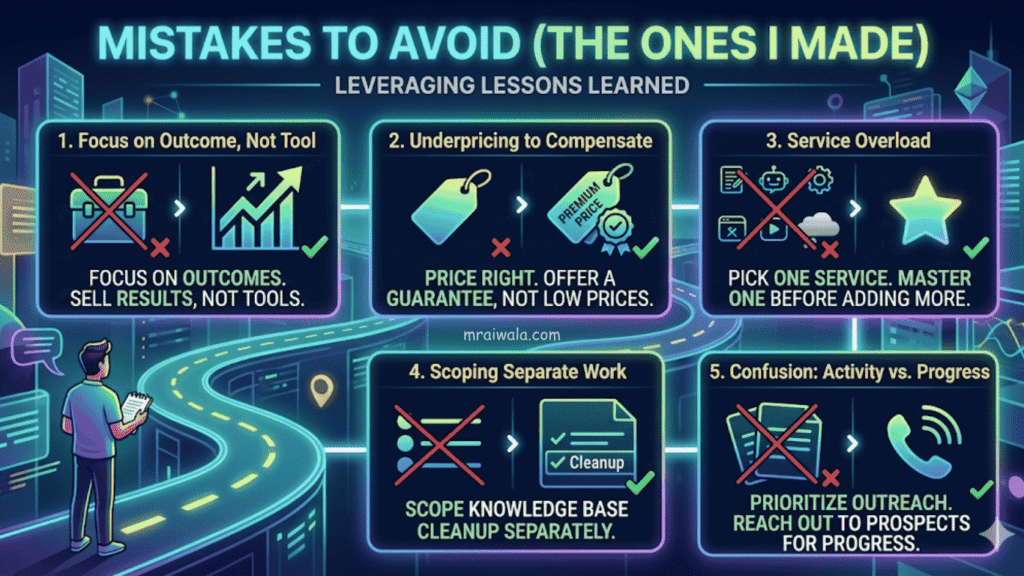
Selling the tool, not the outcome. “I use ChatGPT and Voiceflow” is not a pitch. “I help D2C brands increase checkout conversion by 1–3%” is a pitch. The moment I stopped mentioning AI tools in my proposals, my close rate improved.
Underpricing to compensate for no case study. I priced my first chatbot at $145. Spent 22 hours on it. The client undervalued the work because I did. The correct move: price it right, offer one guarantee: “if you don’t see X result in 30 days, I’ll refund 50%.” That’s a real offer. $145 is just cheap.
Taking on every service simultaneously. Month two, I was offering content writing, chatbots, automation, and video repurposing at the same time. I was mediocre at all of them. Pick one. Be genuinely good at it. Add a second service only after you have two paying clients in the first.
Not scoping the knowledge base work separately. Always quote 4–6 hours of knowledge base cleanup separately in chatbot projects. Always.
Confusing activity with progress. Writing proposals is not working. Learning new AI tools is not working. Reaching out to prospects with a specific offer that’s working. I wasted six weeks optimising my Notion workflow instead of sending outreach.
How to Build Your First Case Study (When You Have No Clients)
You don’t need a client to have proof. You need a result.
For content writing: Pick a real business in your niche. Write 3 blog posts targeting their best keyword opportunities. Publish them on a test WordPress site. Track clicks using Google Search Console for 60 days. Screenshot the data.
For chatbots/automation: Build a working demo using a fictional brand. Record a 4-minute Loom walkthrough showing the bot handling 10 different customer questions. The demo is the proof.
For marketing campaigns: Run a 2-week email campaign for a local NGO or a friend’s small business for free. Document open rates and clicks. Even a 30% open rate in a niche where the average is 21% is worth showing.
What to show clients: a specific before/after number, a Loom walkthrough (not a PDF), and one testimonial, even a WhatsApp screenshot from someone you helped counts.
The goal of the first case study isn’t to impress. It’s to reduce the client’s fear of being first.
What Clients Actually Ask (And What to Say)
“Won’t AI just replace you soon? Why should I pay you instead of using it myself?”
“AI replaces the production, not the strategy. Anyone can use Voiceflow. Fewer people know which questions to ask in your specific funnel, how to A/B test the results, or why your conversion dropped last Tuesday. That’s what you’re paying for.”
“We’ve tried AI tools internally. Didn’t work.”
“That’s actually useful information. Which tools? What was the goal? Nine times out of ten, the problem isn’t the AI; it’s that no one set up the workflow correctly or defined what success looks like. That’s exactly what I fix.”
“Your price seems high for something AI generates.”
“The AI generates faster. The judgment of what to build, how to structure it, and how to measure it is still mine. If you want AI outputs without the judgment layer, ChatGPT is free. What I’m selling is the outcome.”
“Can we try one month and see?”
“Yes. I actually prefer it. Most clients start with a trial run for 6+ months because the results are there. Here’s what the first month looks like…”
Which Service I’d Start in 2026 (Realistically)
If I were starting from zero today, no portfolio, no clients, no testimonials, I’d go with AI Business Automation.
Here’s why: competition is still surprisingly low, the ROI for clients is immediate and measurable, and you don’t need a creative portfolio to sell it. You need one working example and one good audit call.
The pitch runs itself: “Show me your manual processes. I’ll find what’s automatable. You’ll save 10+ hours a week.” Any small business owner understands that without knowing what Make.com is.
Content writing is easier to start, but harder to differentiate. Chatbots pay more but need case studies to close. Automation sits in a sweet spot: learnable in 4–6 weeks, demonstrable without a prior client, and sticky once someone automates their workflow, they keep paying for maintenance.
That’s where I’d put my first 30 days.
If I Had to Restart Tomorrow
No audience. No testimonials. Zero income.
Day 1: Pick one niche. Not “small businesses.” Something specific to D2C brands, local service businesses, online coaches, and recruitment agencies. The narrower the niche, the easier everything else gets.
Day 2: Find 5 businesses in that niche. Don’t pitch. Audit. Look at their website speed, content gaps, social presence, and support response time. Document what’s broken. This becomes your pitch.
Day 3: Write 10 outreach messages. Not templates, each one referencing something specific about their business. Send all 10. Expect 1–2 replies. That’s fine.
Week 2: Do the first project at a slight discount in exchange for documented results and permission to share.
Month 2 onward: Use that case study in every pitch. Stop explaining what AI is. Start showing what changed for someone else.
The first client is the hardest. After that, you’re not selling AI freelance services, you’re selling proof.
Before you close this tab, take this.
I use one audit checklist for every client pitch. It shows what to look for, what to ask, and how to structure an offer that actually closes.
No course. No fluff. Just a Notion checklist you can use today. Download it and use it.
Most people will read this and still wait. They’ll do more research, try more tools, and keep planning instead of acting. That’s the trap.
You don’t need more information. You need one decision. Pick one AI freelancing service, choose one niche, and solve one specific problem. Then focus on getting your first client.
Your first $1K doesn’t come from finding the perfect plan. It comes from closing your second client, then your third. That’s when things start working.
Start this week. Not later. Not after one more video. Start now.
Read This Next 📌
7 Online Earning Platforms for Beginners That Can Reach $1K/Month
5 AI Freelance Jobs From Home That Actually Pay $400–$600/Month

1 thought on “I Tried 7 AI Freelancing Services. 5 Were Useless. 2 Actually Paid Me”