

Building a website can feel hard at first. Which template? What do I write on the About page? Which hosting plan should I buy? Hostinger AI Website Builder tries to skip all that. You describe your business in a few lines, and it creates a first version of your site.
That sounds easy, and often it is. I tried it myself by building a test website for a digital marketing agency, and the first draft followed the look I asked for. But Hostinger’s pricing page has several numbers that mean different things, and the AI credit rules are easy to miss. This review covers both, along with what I saw in my test, the India pricing, the pros and cons, and when Wix, WordPress, Squarespace, or Shopify may suit you better.
Quick Answer: Is Hostinger AI Website Builder Worth It?
Yes, for the right person. It is a good fit if you are a beginner, a freelancer, or a small business owner who wants a site fast, with hosting, a domain, and email in one plan. The starting price in India is low, and you can build by drag-and-drop or by chatting with AI.
But read the fine print. The low price requires 48 months paid upfront. Renewal costs about 2.7 to 3.3 times more. AI credits are described as a one-time gift, so heavy chat editing may cost extra. And moving your site away later is harder than on WordPress.
Pick Hostinger if:
- You want an AI-made first draft of a portfolio, blog, business site or small store.
- You like one plan for the builder, hosting, domain, and email.
- You are fine with the renewal price and refund rules (both explained below).
Look at other options if:
- You need deep design control, a big app marketplace, or a large store.
- You plan to move your site to another platform later.
- You want the lowest total cost over five years, not just the first year.
Want to try it? For a portfolio, blog, or small business site, start with the Unlimited plan.
See Hostinger AI Builder plans and today’s price →
Backed by Hostinger’s 30-day money-back guarantee (exceptions are listed in the pricing section). Affiliate link, no extra cost to you.
What Is Hostinger AI Website Builder?
It is the website tool that comes with Hostinger’s hosting plans. You describe your site, AI builds it, and you publish it on Hostinger’s hosting. Hostinger recently merged its older website builder and its chat-based tool (called Horizons) into one product named AI Builder. Many older reviews describe the old versions, so read them with care.
AI Builder has two modes:
| How they differ | Manual mode | Agentic mode |
| How you build | AI makes the first version. You edit it by drag-and-drop. | You chat with AI, and it changes the whole site for you. |
| Best for | Portfolios, blogs, business sites and stores | Memberships, bookings, portals and custom features |
| Uses AI credits? | Hostinger does not say clearly | Yes, every request |
| Code download | Not directly. Switch to Agentic first | Yes, on paid plans |
How to start. In Hostinger’s dashboard, click Create website, choose AI Builder, pick a mode, and describe your business in up to 700 characters. You can also speak your prompt, upload an image or PDF as a guide, paste a website URL to rebuild it, or start from a template. You need a hosting plan first.
Is it WordPress? No. As far as Hostinger’s documents show, AI Builder sites are not WordPress sites, so WordPress themes and plugins do not apply. Is it a chatbot? No. A chatbot only writes text or code. This tool builds the site and publishes it for you.
Features That Matter
These points come from Hostinger’s own documents. Which feature comes with which plan is not fully clear on the pricing page, so check the live comparison table before you pay.
- AI website creation. Write a short prompt, or give an image, PDF, or URL. Hostinger says the first version takes under a minute. In my test, it took up to five minutes (details in the next section). Treat the result as a draft: rewrite the text, swap the images, and check every detail.
- Editing. In Manual mode, you change text, images, sections, colours and fonts, and you can check the mobile view. In Agentic mode, you ask AI to change text, design, and even how the site works. Hostinger’s page says direct text and image edits cost no credits, but a help article says they cost 0.01 to 0.05 credits. It is a tiny amount, but the two pages disagree.
- Templates. Hostinger’s pages mention 140, 400+, and 600+ templates. Do not pick a plan for this number.
- Website types. Business sites, portfolios, blogs, link-in-bio pages, bookings, memberships, online stores, digital products, and affiliate pages are listed. Agentic mode can add databases, user accounts, and file storage. It cannot build 3D games, browser extensions, trading or banking apps, or phone apps for the App Store or Google Play.
- AI writing, images and logos. Hostinger lists an AI writer, blog generator, product descriptions, image generator, and logo maker. They are useful for first drafts. Check facts, prices, and claims yourself. How image and logo tools use credits is not clear.
- SEO. Sitemap, robots.txt, and llms.txt files are created automatically on a custom domain. In Manual mode, you edit titles and descriptions in an SEO panel. In Agentic mode, you ask the AI. One caution: Hostinger says the site is ready for search engines that can read JavaScript pages. No builder can promise rankings, traffic, or mentions in AI answers.
- Online store. You can use Stripe, PayPal (Business account) and Razorpay (store location must be India). Hostinger advertises 0% transaction fees. That is Hostinger’s own fee. The payment gateway still charges its fee. You can sell digital downloads, and shipping tracking works with 40+ carriers. “Ecommerce available” is listed on Unlimited and Cloud Startup. For Premium, confirm at checkout. Indian sellers should also check GST invoices and local couriers, which I could not confirm.
- Integrations. Google Analytics, Google Ads, AdSense, Tag Manager, Meta Pixel, WhatsApp, Hotjar, and Hostinger Reach email marketing are listed. Manual mode has limited integrations. Agentic mode is better for connecting outside services. Check which plan includes which.
- Hosting, domain, and security. Hosting is included, and SSL is set up when you publish. A custom domain and mailboxes are free for the first year. 24/7 support is included, with priority support on the higher plans.
My Hands-On Test: A Digital Marketing Agency Website
Feature lists only tell you so much, so I used the builder to create a website for a digital marketing agency project called wpgeekhub. I wanted a modern dark design with blue, purple and cyan gradients, clear service sections, and strong calls to action.
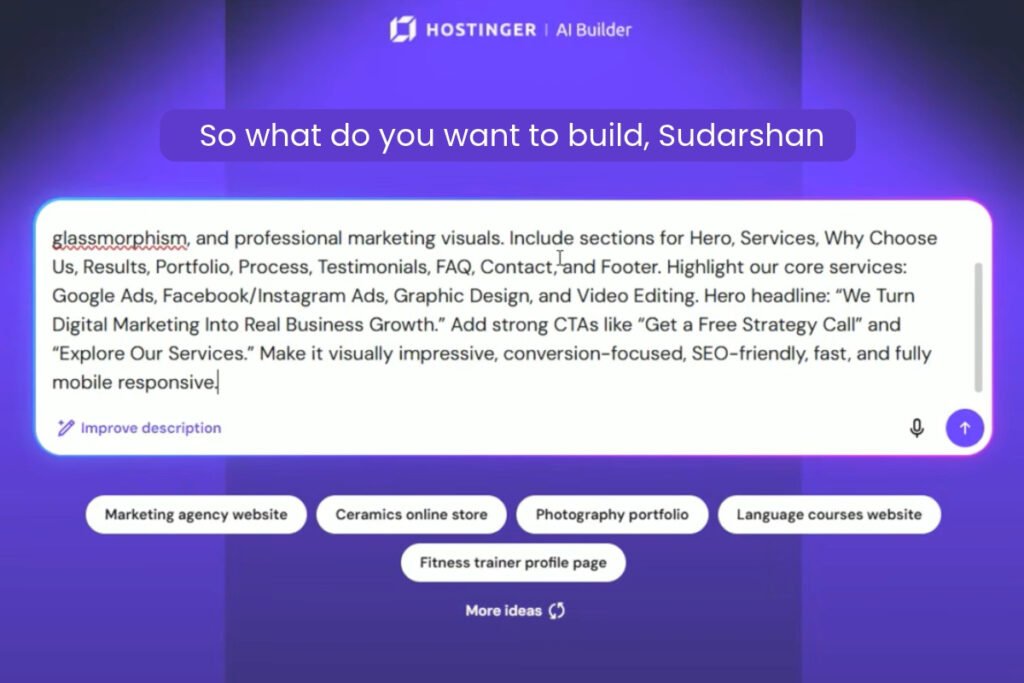
The prompt I used. I wrote one detailed brief. A vague prompt tends to give a generic site, so I named the style, sections, services, headline and buttons:
Create a modern, premium, responsive digital marketing agency website for wpgeekhub. Use a dark, futuristic design with vibrant blue, purple, and cyan gradients, bold typography, smooth animations, glassmorphism, and professional marketing visuals. Include sections for Hero, Services, Why Choose Us, Results, Portfolio, Process, Testimonials, FAQ, Contact, and Footer.
Highlight our core services: Google Ads, Facebook/Instagram Ads, Graphic Design, and Video Editing. Hero headline: “We Turn Digital Marketing Into Real Business Growth.” Add strong CTAs like “Get a Free Strategy Call” and “Explore Our Services.” Add relevant, high-quality images in the right places throughout the website, matching each section’s content and design. Make it visually impressive, conversion-focused, SEO-friendly, fast, and fully mobile-responsive.
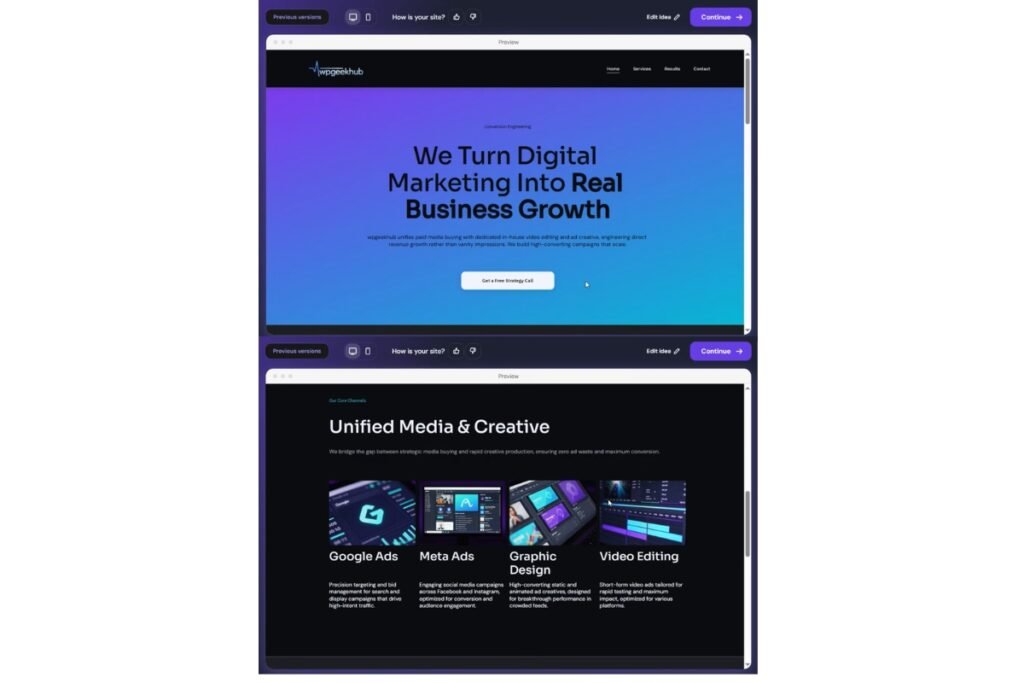
What it generated. The first version took up to five minutes, slower than Hostinger’s “under a minute” claim. The draft was a dark, modern agency-style page with:
- Hero section: my headline, a short intro and a “Get a Free Strategy Call” button, on a gradient in the colours I asked for.
- Services: four cards for Google Ads, Meta Ads, Graphic Design, and Video Editing, each with a visual, a heading and a short description. The builder renamed my “Facebook/Instagram Ads” to “Meta Ads”.
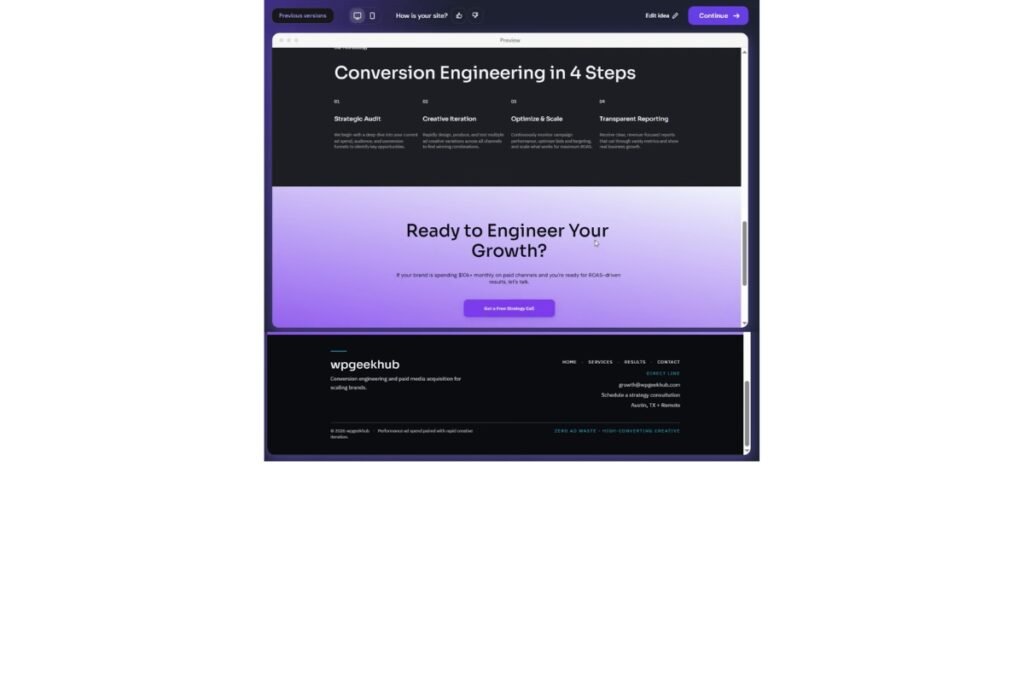
- Process: a section called “Conversion Engineering in 4 Steps” (Strategic Audit, Creative Iteration, Optimize & Scale, Transparent Reporting).
- Closing call to action: “Ready to Engineer Your Growth?” followed by a dark footer with wpgeekhub branding, navigation links and contact information.
I had asked for ten sections. My screenshots show only the sections above, so I can’t confirm that Results, Portfolio, Testimonials, FAQ, and Contact were all built. If the builder fills those with sample numbers or quotes, replace them with real ones before you publish.
Editing the draft. After the first version, there are two ways to refine it. You can write a plain-language instruction, such as changing the hero background, rewriting a heading, updating a service description, or changing button text. Or you can use the visual editor to change headings, text, buttons, colours, images and some layout. The controls depend on the element and the editor mode, so not every change works by drag-and-drop alone. Check each AI change, and if it misses, rephrase the instruction.
Is it beginner-friendly? For common content and design changes, you do not need HTML, CSS, or JavaScript. You start from a written description and refine in everyday language. Complex layouts, advanced integrations and custom features may still need technical knowledge.
What I did not test. My test covered the first draft, its visible design and the editing options. I did not check every button and link, the contact form, how the published site looks on different phones, page speed, search rankings, or whether it brings in enquiries. I asked for a mobile-friendly design, but asking is not proof, so open your site on a real phone before you publish.
The first draft was a useful starting point, not a finished website. How good the final site is depends on how carefully you edit, check, and test it.
Try Hostinger AI Website Builder
AI Credits: Read This Before You Pay
- In Agentic mode, every request uses credits. A simple request uses little (Hostinger’s example is 0.12). A heavy one uses more (2.45). Hostinger has since changed its credit scale, so old numbers in other reviews will not match.
- Plan credits are called a “one-time gift” on the pricing page. But a help article says Agentic mode needs an AI credit plan with monthly credits. So I cannot say whether your credits ever refill. Ask Hostinger support before you buy.
- You can buy top-ups. Credits are not refundable.
- Credits are one shared balance across AI Builder, Hostinger Agent, Reach and GPU.
- I did not record how many credits my own test used, so I cannot give you a real-world figure.
Hostinger AI Website Builder Pricing in India
Prices shown are from Hostinger’s India page on 21 October 2026 during a sale. Monthly rates are calculated for a 48-month term, paid upfront. Prices exclude GST. Renewal rates may differ.
| 48-month plan | Premium | Unlimited | Cloud Startup |
| Price shown | ₹139/mo | ₹199/mo | ₹599/mo |
| Paid upfront (48 months) | ₹6,672 | ₹9,552 | ₹28,752 |
| Renewal price shown | ₹449/mo | ₹649/mo | ₹1,599/mo |
| Websites | Up to 3 | Unlimited* | Unlimited* |
| Mailboxes (free for 1 year) | 2 per website | Unlimited | Unlimited |
| Domain | Free for 1 year | Free for 1 year | Free for 1 year |
| AI credits (one-time) | 250 (500 in Black Friday offer) | 500 (1,000) | 1,000 (2,000) |
| Ecommerce | Confirm at checkout | Listed as available | Listed as available |
| Support | Hostinger Agent chatbot | Priority 24/7 expert | Priority 24/7 expert |
| Good for | First site, portfolio, blog | Growing business, store | Heavier, busy projects |
Subject to Hostinger’s Fair Usage Policy.
Three things to understand
- You pay upfront. ₹139 a month is not charged monthly. It is ₹6,672 for 48 months, paid on day one, plus GST. The page shows only the 48-month option.
- Renewal is higher. Premium renews at ₹449 a month, Unlimited at ₹649, Cloud Startup at ₹1,599. That is about 2.7 to 3.3 times the first price. The renewal term is not stated. If Premium renewed for 12 months at this rate, it would be about ₹5,388 plus GST a year. That is my estimate, not a Hostinger figure. The domain’s renewal price after year one is also not shown.
- “Up to 80% off” is a sale label. It compares the price with a higher “regular” price, such as ₹679 a month for Premium. Do not plan around it. Offers as double credits can end at any time.
Outside India? Hostinger’s global page shows US dollar prices. Premium is $2.49 a month ($119.52 for 48 months, renewing at $10.99). Unlimited is $3.49 ($167.52, renewing at $16.99). Cloud Startup is $7.99 ($383.52, renewing at $25.99). The credits and plan features are the same. Do not compare these with the ₹ prices, because the market and taxes are different.
Refunds. Hostinger offers a 30-day money-back guarantee. Know the exceptions: AI Builder credits are not refundable. The Agentic plan is refundable only if you used fewer than 30 prompts. A free domain and domain renewals are not refundable. Tip: test both modes in your first few days.
Check current Premium and Unlimited prices on Hostinger → Sale prices change.
Hostinger AI Website Builder Pros and Cons
Pros
- Fast first draft. A short description gave me a working site structure. It took up to five minutes in my test, which is still quicker than designing from scratch. This helps most if you usually get stuck at the start.
- Everything in one plan. Builder, hosting, SSL, plus a free domain and mailboxes for a year.
- Two ways to build. Drag-and-drop for simple sites, chat for custom features.
- Low starting price in India. ₹6,672 upfront for Premium is small next to hiring a developer.
- Razorpay support. Indian sellers get Razorpay next to Stripe and PayPal, with no Hostinger sales fee.
- SEO basics are automatic.
Cons
- Big renewal jump. Over five years, renewal can cost more than the sale price.
- Four years paid upfront. If your plans change, you are locked in after the 30-day window.
- Credits can run out. Heavy Agentic use may need paid top-ups.
- Hard to move away. Code download works through Agentic mode, and the code is a React project, not a WordPress export. Moving to WordPress or Wix likely means rebuilding. This is my reading of the documents, not a tested move.
- Hostinger’s pages disagree in places. Mode switching, template count, credit costs and plan names all differ between pages.
- Not for every need. Manual mode has limited integrations. Agentic sites rely on JavaScript, so check how Google indexes them.
When Might Another Website Builder Be Better?
Competitor prices below come from third-party price trackers, mostly in US dollars. Check each company’s official page before you decide.
- Wix. Four plans, listed at about $17, $29, $39 and $159 a month on yearly billing. You need the second plan (Core) or higher to sell online. Good if you want a mature visual editor and a large app marketplace. It costs more as you add store features.
- Squarespace. Four plans, listed at about $16, $23, $39, and $99 a month on yearly billing. Good for design-led portfolios and creative or service businesses. Check its transaction fees on the official page, as trackers disagree.
- WordPress. WordPress.com plans are listed at about $4, $8, $25 and $45 a month on yearly billing. Self-hosted WordPress runs on any host. It is best for blogs, SEO control, plugins and moving your site freely. You manage more updates and security yourself.
- Shopify. India plans are listed at about ₹399, ₹1,499, ₹5,599, and ₹22,680 a month on yearly billing, before 18% GST. Shopify Payments is not live in India, so you pay a gateway fee plus a Shopify fee of 2% on Basic and lower on higher plans. Apps often add ₹500 to ₹5,000 a month each. Best for a serious store with many products.
| How they differ | Hostinger AI Builder | Wix | Squarespace | WordPress | Shopify |
| Best for | Beginners, portfolios, small business sites | Design freedom, big app market | Design-led, creative sites | Blogs, content, full control | Online stores |
| Customizing | Drag-and-drop or chat | Wide visual control | Polished templates, less free-form | Most flexible, harder to learn | Store themes |
| Blogging | Supported | Built-in | Built-in | Strongest | Basic |
| Online store | Stripe, PayPal, Razorpay | Core plan or higher | Available, fees vary | Plugins, more setup | Strongest |
| Starting price | ₹139/mo, 48 months upfront | About $17/mo | About $16/mo | About $4/mo (WordPress.com) | About ₹399/mo lowest plan; ₹1,499/mo next plan |
| After year one | Renews higher | Store tiers cost more | Higher tiers mostly cut fees | Depends on host | Apps and fees add up |
| Moving your site | Code download via Agentic | Limited, check | Limited, check | Easy on self-hosted | Check exports |
| Beginner friendly | High | High | High | Medium | Medium to high |
Which Option Fits You?
- Beginners. Hostinger Premium in Manual mode is a simple start. Confirm credits and renewal price first.
- Freelancers and portfolios. Premium lists portfolio sites with a free domain for a year. Squarespace may look more polished. WordPress is easier to move later.
- Small businesses. Hostinger lists booking sites. Confirm booking is on your plan. Add real photos, areas served and contact details yourself.
- Bloggers. Hostinger works for a simple blog next to a business site. For heavy publishing, WordPress gives more SEO control.
- Affiliate marketers. Hostinger lists affiliate pages, Analytics, Tag Manager, Meta Pixel, and AdSense. A builder does not make a site follow ad or affiliate rules. You still need clear disclosure and original content.
- Online stores. Unlimited can suit a small store with Razorpay or Stripe. Test checkout, GST invoices and shipping first. For big catalogues, choose Shopify.
- Agencies and designers. Unlimited and Cloud Startup list unlimited websites, subject to fair usage. My own test was an agency-style site, and the first draft was a good starting point. Read the AI Builder terms on code ownership and client handover first.
How I Reviewed This, and My Disclosure
On 21 October 2026 I read Hostinger’s India AI website builder page, its global AI Builder page, help-center articles on AI Builder, credits, payments and SEO, and the India refund policy. Prices, renewal, refund, and credit rules come from those pages. I also built one test site, the agency website described above. That test covered only the first draft, its visible design, and the editing options. I did not test the online store, bookings, SEO files, integrations or code download, and I did not measure speed, search ranking, or mobile behaviour. This is why I do not give the builder a star rating.
Affiliate disclosure. This article contains affiliate links. I may earn a commission if you purchase through certain links, at no additional cost to you. A commission gives me a reason to recommend a product, so I show the limits and the alternatives too. MrAiwala is an independent site. It is not Hostinger, and this is not an official endorsement.
FAQs: Hostinger AI Website Builder
1. Is Hostinger AI Website Builder good for beginners?
Yes, Hostinger AI Website Builder is a good option for beginners who want to create a website without coding. Manual mode is easier for basic websites, while Agentic mode lets you make changes through chat. In my test, a detailed prompt generated a useful first draft, although it still needed editing and checking.
2. How do you use Hostinger AI Website Builder?
Start by choosing an eligible Hostinger plan and opening your dashboard. Select AI Builder, choose a building mode, and describe the website you want to create. Once the first draft is ready, edit the text, images, colours, and layout. Check every page, link, and form before publishing.
3. Is Hostinger AI Website Builder free?
Hostinger AI Website Builder is included with eligible paid hosting plans rather than being a completely free, standalone website builder. Some plans include AI credits, but additional credits may cost extra. Check the current plan details and credit rules before purchasing.
4. How much does Hostinger AI Website Builder cost in India?
On 21 October 2026, Hostinger’s India pricing page showed Premium at ₹139 per month, Unlimited at ₹199, and Cloud Startup at ₹599. These prices required 48 months of upfront payment and excluded GST. The advertised renewal rates were higher, and prices may change.
5. What are the disadvantages of Hostinger AI Website Builder?
The main disadvantages include paying for 48 months upfront to get the lowest advertised price, higher renewal rates, and possible extra costs for AI credits. Moving to another platform can also be difficult because downloading the code does not provide a direct WordPress or Wix export. Some features and integrations depend on the plan and building mode.
6. Can I move my Hostinger AI website to WordPress or another platform?
Paid plans support code downloads through Agentic mode, but the downloaded code is a project rather than a direct WordPress or Wix export. Moving the site may require rebuilding its design and functionality on the new platform. If portability and long-term control are priorities, consider self-hosted WordPress before choosing a builder.
Final Verdict
Hostinger AI Website Builder is a smart, low-cost start for beginners, freelancers, and small businesses. You get a fast draft, two ways to build, Razorpay support, and automatic SEO files, all in one plan. In my test, the first draft followed my brief closely, though it still needed checking before it could count as a finished site.
The limits are real too. The best price needs 48 months upfront. Renewal is about 2.7 to 3.3 times higher. AI credits may not refill. Your site is harder to move than a WordPress site. A few Hostinger pages also disagree, so confirm the live terms before you pay.
Choose another platform if design control matters most (Wix or Squarespace), if you publish a lot of content (WordPress), or if you run a serious store (Shopify). My advice, based on Hostinger’s published terms and one test build: if you want a simple site or small store, and you are fine with the renewal price and refund rules, Hostinger is worth a try. If you may move platforms or grow into heavy content, compare WordPress first.
Ready to start? Check the credit rules and renewal price, pick the plan that matches your project, and test it inside the 30-day window. Start with Hostinger AI Builder →
(Affiliate link, no extra cost to you.)
Worth Exploring 📌
I Tried an AI Website Agency in India (A Real ₹11,000 Case Study)
AI Side Hustles for Beginners: 5 Real Ways to Make Your First Sale
ChatGPT vs Gemini vs Claude: Which AI Is Best for Blogging, YouTube & Freelancing Today?

1 thought on “I Tested Hostinger AI Website Builder: In-Depth Review Is It Worth It?”