


If you’ve searched “AI website agency India,” you’ve probably seen the pitch: AI builds a website in minutes, so you can start an agency with zero skill and start earning fast. That first part is true. AI genuinely can generate a working site in minutes.
What the pitch usually leaves out is everything that decides whether you actually make money: which niche to pick, how to find prospects worth calling, what to say when someone picks up the phone, how to price without working for free, and how to deliver without a mess of revisions and disputes.
I wanted to find out for myself, so I picked a niche, built a demo, made cold calls, negotiated, closed a deal, and delivered a website start to finish. This is what happened, along with the full system I used, not just the story.
Quick Answer: The 7-Step Blueprint I Followed
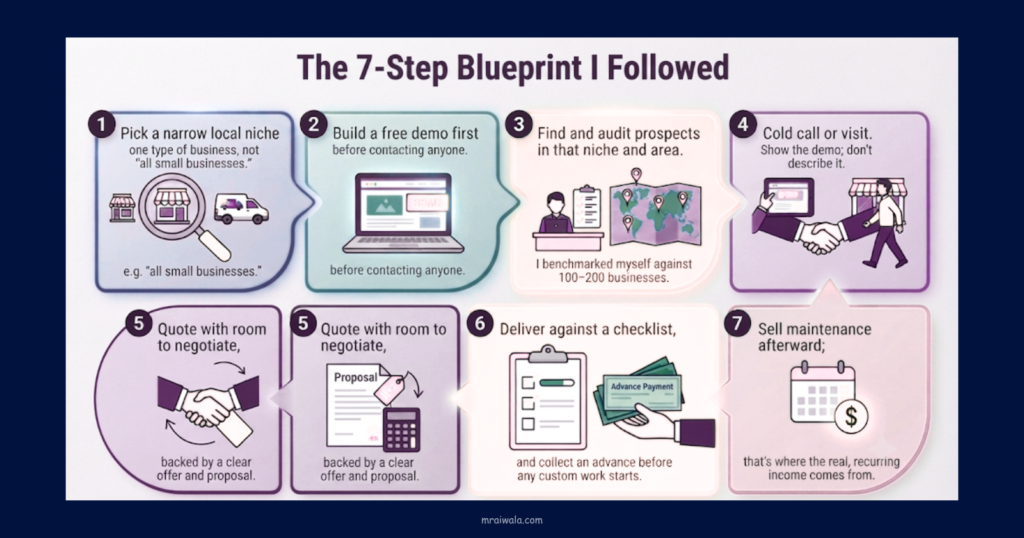
- Pick a narrow local niche one type of business, not “all small businesses.”
- Build a free demo first, before contacting anyone.
- Find and audit prospects in that niche and area. I benchmarked myself against 100–200 businesses.
- Cold call or visit. Show the demo; don’t describe it.
- Quote with room to negotiate, backed by a clear offer and proposal.
- Deliver against a checklist, and collect an advance before any custom work starts.
- Sell maintenance afterward; that’s where the real, recurring income comes from.
My ₹11,000 Deal: The Real Numbers
What I wanted to test: whether I could actually close a paying client for an AI-built website, not just build a demo and hope. I wasn’t trying to prove this was a full business yet, just that one deal, done properly, could work.
What I chose: I picked local dental clinics as my niche. They show up on Google Maps, but a lot of them are running on just a listing, with no real website a gap that’s common among small Indian businesses in general.
What I actually did: I built a free demo, went through my prospect list, made calls, and eventually got one clinic interested enough to negotiate and close.
The actual deal:
| Item | Number |
| Quoted price | ₹20,000 |
| Final closed price | ₹11,000 |
| Tool + hosting + domain cost | Deducted from the deal |
| Net profit on this deal | ₹8,746 |
I’m reporting ₹8,746 as net profit after tool, hosting, and domain costs. I didn’t keep an itemized breakdown of every rupee spent, so I’m not going to manufacture one here to make the table look neater than it actually was. I also didn’t sell maintenance on this particular deal; that’s a separate opportunity I cover later.
I also didn’t track the total hours I put into prospecting, calls, follow-ups, building the demo, negotiating, developing, and handling revisions. Which means I genuinely can’t calculate an honest hourly profit figure for this deal, and I’m not going to pretend otherwise. If you’re doing this yourself, track your hours from day one. Net profit ÷ total hours is the number that tells you whether a niche is actually worth scaling, not the deal size on its own.
What happened: I quoted ₹20,000, negotiated down to ₹11,000, and still walked away with a profit after costs. One deal like this won’t replace a salary. I’m treating it as proof of concept, not a business yet.
What I learned: ₹20,000 → ₹11,000 is what this one clinic agreed to. It’s not a market rate for India; pricing depends heavily on niche, city, and scope, which I get into later. The recurring tool subscription is a real, ongoing cost, and I made sure to price it into the quote rather than treating it as a one-time expense.
What My ₹11,000 Client Actually Got
I want to be honest about what I can and can’t confirm here. What I know for certain: the niche (a dental clinic), the pricing (₹20,000 quoted, ₹11,000 closed), and the profit I ended up with. What I haven’t documented precisely: the exact pages built, the number of revisions, the hosting arrangement, and the delivery timeline for this specific project.
So instead of guessing at specifics I don’t have on record, I’ll say this plainly: it was a personalized website built from my demo, customized with the clinic’s actual details. The package I describe in “The Offer” section below is the general scope I’d recommend for this kind of project; treat it as a starting template, not a confirmed record of exactly what this one client received.
What an AI Website Agency Actually Sells
You’re not selling an AI-generated website. You’re selling online presence → credibility → enquiries and appointments → an easier way for customers to reach the business.
AI handles: layout, first-draft copy, stock images, speed.
You handle: niche research, finding the right prospect, the sales conversation, customization, quality checks, basic SEO, client communication, and maintenance.
AI removes the design and coding barrier. It does nothing for the rest, and that’s where the real work, and the real value, sits.
If a client can technically build a website with the same AI tool, why pay you? Because they’re paying for the outcome and the execution, not for access to the tool. That payment covers customization to their actual business, professional presentation, correct setup, mobile optimization, a working contact/WhatsApp conversion path, basic SEO, on-time delivery, and someone accountable if something breaks. The tool is available to anyone. Doing all of the above reliably, for a business owner who has no interest in learning any of it, is the actual service.
Want to Build Your First AI Website? → Start with Hostinger
Choosing a Profitable Niche
Before picking a niche, I ran it through these questions:
- Do customers find this business mainly through local search?
- Does a professional website affect trust for this kind of business?
- Is average customer value high enough to justify the spend?
- Are many businesses in this niche still without a decent website?
- Can you reach the owner directly, or is there a gatekeeper?
- Can you show a visible improvement in a two-minute demo?
- Is there a natural reason for ongoing work SEO, updates?
Dental clinics scored well on all seven for me: local customer base, high trust dependency, plenty of clinics running on just a Google listing, owners usually reachable directly, and an obvious before/after in a demo. Run this same check on your niche before committing; don’t just copy mine.
Finding and Auditing Businesses
I didn’t contact businesses at random. I only reached out where I could point to a specific, visible problem.
Where to find them: Google Maps for your niche + city, local directories, or walking the commercial area you’re targeting.
The 2-minute audit I used on each prospect:
- No website, or one that’s broken or not mobile-friendly
- No visible phone number or WhatsApp/contact button
- No easy way to book or enquire
- Services or pricing not listed clearly
- No reviews or trust signals
- Address or location unclear
- Homepage doesn’t explain what they do quickly
- No obvious next action for a visitor
I prioritized businesses failing the most checks; that’s where my pitch had the clearest “here’s what’s broken, here’s the fix” story. I skipped anyone with an already-solid website; that’s a harder conversation for a weaker close rate.
I contacted businesses at roughly the 100–200 mark during this run. Treat that as my personal benchmark, not a rule; your own number will depend on your niche, city, and close rate.
Which AI Website Builder I Used
I picked a tool that’s fast, low-cost, and needs no design skill. I used Hostinger’s AI website builder; it’s built for small local-business sites and priced for the Indian market.
At the time I used it, pricing ran roughly ₹149/month, billed as ₹7,152 upfront for 48 months, with renewal at close to three times the intro rate. There’s no free plan, but there’s a 14-day trial and a 30-day money-back guarantee, which let me test it before committing.
A caveat worth repeating: verify current pricing before you quote a client. Plans change often, and I’d price around the renewal rate, not the intro rate that’s your real ongoing cost if you’re still managing the site years down the line.
Any AI builder that generates a working demo quickly and hosts it affordably will do the job. Picking one shouldn’t take you more than an afternoon of testing.
“Build Fast. Launch Smart. With Hostinger. → Click Here”
How Much Did It Cost Me to Start?
My main upfront cost was the website builder plan, plus hosting and domain setup, along with whatever tools I used for prospecting and delivery. I can’t give you a precise total startup figure here because I didn’t itemize every expense as I went.
Practically, here’s what I’d suggest: start with the minimum plan needed to build one client-ready demo. Don’t buy extra tools upfront on the assumption you’ll need them later. Once you’ve actually closed a client, build your recurring tool and hosting costs into that client’s pricing covered in the pricing section below.
Build a Personalized Demo, Not a Generic One
A generic demo says “I make websites like this.” A personalized one says “here’s your business, live.”
“I built a sample dental clinic website.”
“I built this using your clinic’s actual name, services, and location.”
Using a prospect’s real business details before I even called them took a few extra minutes, but it changed the entire conversation. The prospect isn’t judging a concept anymore; they’re looking at something with their own name already on it.
The Offer: What I’m Actually Selling
I defined this before any call, so I wasn’t improvising scope live on the phone.
Basic package, typically: homepage, about, services, contact pages; WhatsApp/phone CTA; mobile optimization; basic on-page SEO; contact or appointment form.
State clearly, every time: what’s included and excluded, revision limit, delivery timeline, who owns hosting and domain, and whether maintenance is separate or bundled.
Writing this once as a standard offer prevented most disputes for me. Most disagreements come from unclear scope, not bad work.
Pricing: The Framework, Not Just the Number
Price = build effort + tool/subscription cost + hosting/domain + revision buffer + risk margin + target profit
I decided before quoting, not during the call: my minimum acceptable price, my target price, my maximum discount, and my revision limit.
I quoted at my target price, expecting to negotiate toward my minimum; that’s exactly how the ₹20,000 → ₹11,000 conversation played out for me. Treat that figure as one data point from my own experience, not a rate card. What actually matters is knowing your own floor before you pick up the phone.
The Cold Calling System I Used
Before: research the prospect, complete the audit, identify one specific problem, have the demo ready.
During: brief introduction → state the specific problem → one-line value → show the demo → ask for a clear next step.
After: send the demo link, follow up on a specific date, send a proposal once there’s real interest.
The biggest mindset shift for me: the first call’s goal isn’t to sell the website; it’s to secure the next demo or conversation. Treating every call as close-or-lose just adds pressure that hurts the pitch.
Example Scripts Based on the Process I Used
I want to be upfront: these aren’t a word-for-word transcript of the actual ₹11,000 call. I don’t have that recorded. These are illustrative scripts built on the process above, meant to give you a usable starting point.
Cold-call opening:
“Hi, I’m calling for [business name]. I noticed your clinic doesn’t come up with a website when I searched for [service] near [area]. I actually built a sample homepage using your details. Want me to send it over?”
WhatsApp follow-up after the call:
“Hi [name], here’s the demo we spoke about: [link]. Take a look when you get a chance. Happy to walk you through it or make changes if something doesn’t fit.”
“Send me the details” response:
“Sure, here’s the demo [link] and a quick summary of what’s included: [1–2 lines from your offer]. Let me know what you think, and I can send a full proposal.”
“It’s too expensive” objection:
“Totally understand. Just to be clear on what’s included, it’s not just the homepage; it’s mobile optimization, a working contact form, and basic SEO setup too. Want me to break down the scope so you can see where the cost goes?”
“I already have a website” objection:
“That’s good to hear. Mind if I take a quick look? Sometimes one or two small things are costing you enquiries; happy to point them out either way.”
“Let me think about it” follow-up:
“No problem at all. I’ll follow up on [specific date]. Does that work, or would another day be better?”
Handling the Common Objections
“I already have a website.” Audit it live with them; point to one or two specific gaps.
“₹11,000/₹20,000 is too expensive.” Explain what’s included. In my experience, this is usually scope confusion, not a real budget refusal.
“I’ll just make one myself with AI.” Fair; the tool is genuinely easy. What they’re paying for is setup, customization, and accountability, not the AI itself.
“Let me think about it.” Set a specific follow-up date before ending the call.
“Send details on WhatsApp.” Send a short offer, the demo link, and one clear next step.
“Will this guarantee more customers?” I never promise this. A website improves credibility and makes it easier for interested people to convert; it doesn’t create demand out of nowhere.
Proposal and Payment
A proposal should state: scope, pages, features, timeline, price, revision count, hosting responsibility, maintenance terms, payment terms.
Payment flow: advance → build → client review → final payment → handover.
I don’t start custom work without an advance. It protects your time if the client disappears mid-project, and it’s standard practice for a reason.
Delivery Checklist
Before handover, I confirm: mobile responsive, desktop checked, working contact form, clickable phone number, WhatsApp button, correct address and hours, services listed accurately, images loading, testimonials included where available, clear homepage CTA, favicon set, SEO title/meta added, images compressed, SSL/HTTPS active, domain connected, analytics or Search Console set up where relevant, backup taken, final client sign-off.
Skipping items here is how a “quick AI website” turns into a support headache a week later.
Profit: Look Past the Sale Price
Revenue minus hosting, domain, tool cost, payment fees, your time, extra revisions, and client-acquisition effort = actual profit.
A ₹20,000 website isn’t automatically a ₹20,000 earning. In my case, it wasn’t even an ₹11,000 earning; once costs were factored in, it came to ₹8,746. Run this calculation for every deal before you decide your pricing actually works.
One-Time Build vs. Recurring Revenue
The build fee is the smaller, harder-to-scale part. The real opportunity: website → maintenance → basic SEO → landing pages → content updates → additional services.
A simple maintenance package hosting management, small edits, backups, monitoring billed monthly, is where a client becomes worth more than the one-time build. I’d offer it once the site is delivered and the client is happy, not in the first pitch. I didn’t sell maintenance on this particular deal, so I can’t share results from it yet just the logic for why it matters.
A 30-Day Execution Plan
- Week 1: Niche, city, offer, demo.
- Week 2: Prospect list and audits.
- Week 3: Daily outreach, demos, follow-ups.
- Week 4: Proposals, negotiation, first delivery.
My goal for month one was completing this cycle once, not hitting a revenue number. Income follows once you actually know your own conversion rate.
Metrics Worth Tracking
Track the funnel, not just deals closed: prospects contacted → calls answered → real conversations → demos shown → proposals sent → deals closed → average deal value → cost to acquire a client → delivery time → profit per client → clients retained for maintenance.
These numbers help you spot where the problem actually is: a low answer rate points to targeting or contact-method issues, while a weak demo-to-close rate usually points to problems with the offer, pricing, trust, or objection handling.
What Makes This Model Fail
- Niche that fails the evaluation checklist
- Too little outreach volume
- Weak, non-personalized demo
- No differentiation from “just use the AI tool yourself”
- Underpricing with no real margin
- Unlimited free revisions
- Custom work started without an advance
- No follow-up system
- Leading with “AI” instead of the outcome
- Treating AI output as final without customizing it
- Expecting passive income
Who Should and Shouldn’t Start This
Fits if you: are comfortable with outbound sales, can handle a low response or close rate without it affecting your pitch, and will treat maintenance clients as the real long-term business.
Doesn’t fit if you: want passive income, dislike rejection, won’t communicate directly with clients, or expect the AI tool to find and close clients for you.
FAQs: AI Website Agency in India
Can you actually make money selling AI websites in India?
Based on my experience, yes, but the money comes from sales effort and volume, not the AI tool itself. Maintenance income matters more long-term than the one-time build fee.
How much should I charge for an AI website in India?
Use the pricing formula above and quote with room to negotiate. ₹20,000 → ₹11,000 is what worked for me with one clinic, not a universal rate.
How much does it cost to start an AI website agency?
Mainly the builder plan, hosting, and domain. I didn’t itemize an exact figure myself, so start with the minimum setup needed for one demo rather than buying tools upfront.
Do clients care that a website was built with AI?
In my experience, generally no, as long as it looks professional and works. They’re judging the result, not the method.
Is AI website building passive income?
No. AI removes the design and coding barrier; it does nothing for prospecting, sales, negotiation, or client management, which is where most of the work actually is.
What happens if a client asks for custom functionality?
Be upfront about what your builder can and can’t do. Standard builders handle typical business sites easily but hit limits on complex booking systems or non-template layouts; quote those separately or refer out.
Final Reality Check
The AI tool is the easy part. The difficult part is everything around it: niche selection, prospecting, sales, negotiation, delivery, and client management. That’s where the actual money is decided, and it’s what took me the most time and effort in this whole process.
Start here:
- Pick one niche + one city.
- Find one business with an obvious website gap.
- Build one personalized demo.
- Prepare your offer and minimum price.
- Contact your first 20 prospects.
- Track calls → demos → proposals → closes.
If this process sounds realistic, don’t overthink it further; pick a niche, build one personalized demo, and make your first 20 calls this week. That’ll teach you more about your own close rate than another article will.
Read This Next 📌
AI Side Hustles for Beginners: 5 Real Ways to Make Your First Sale
I Researched 50+ AI Affiliate Programs. These 15 Actually Pay Well
Most AI Agents for Small Businesses Fail Quietly. These 7 Don’t.
